Building a Fivetran Custom Connector with API Pagination

Understanding and debugging your Fivetran custom connector is not straightfoward, with many online tutorials excluding the key component of data API's... pagination. After reading this blog you will have a better understanding of the expected behaviour between Fivetran and your custom connector when pagination is thrown into the mix.
Overview
A Fivetran custom connector is a cloud hosted function that can be set up on a cloud platform of your choice, which allows you to load data into Fivetran with a API Fivetran does not natively support.
Like standard connectors, custom connectors have a number of benefits:
- Incremental updates
- Source data type inference
- Automatic schema updates
- Data de-deduplication
- Destination ingestion optimisations
- Logs and alerts to monitor events and troubleshoot issues
Use Fivetran's Function connectors if:
- Fivetran doesn't have a connector for your source
- You are using private APIs or custom applications
- You are using a source or API that Fivetran is unlikely to support in the near future
- You want to sync unsupported file formats that require pre-processing
- You have sensitive data that needs filtering or anonymizing before entering the destination
Fivetran . Fivetran Custom Connector. (n.d.). Retrieved May 26, 2022, from https://fivetran.com/docs/functions
General Principles
State Management
State is a JSON object that contains cursors from the previous successful Fivetran executions run.
https://fivetran.com/docs/functions/faq/use-state-object
https://fivetran.com/docs/functions/faq/use-secrets-object
Potential Issues to Consider
- Lambda timeouts and payload limit, see documentation
- Ensure calls to the Lambda are idempotent for a given Fivetran cursor
- Be wary or avoid using cursors supplied by the pagination of an upstream API that may not be persistent.
Fivetran Pagination
Fivetran pagination allows your lambda function to specify if there is more data to be collected, this is achieved using the hasMore boolean return.
When hasMore = True, state is updated as normal, however, Fivetran immediately calls the lambda with the updated state. This will keep occurring until hasMore = False, which then resets Fivetran to its default state.
https://fivetran.com/docs/functions/faq/use-hasmore-flag
Example Expected function payload
{
      state: {
        cursor: '2020-01-01',
        paginationCounter: 0
      },
      secrets: Object
    }
Example Expected Connector response format
state: {
cursor: cursorPoint,
paginationCounter: 1
    },
    insert: {
      Table: apiResponseJson
    },
    schema: {
      Table: {
        primary_key: ['some_unique_key']
      }
    },
    hasMore: boolean
  }
}
Sequence of Fivetran Connector Excecutions
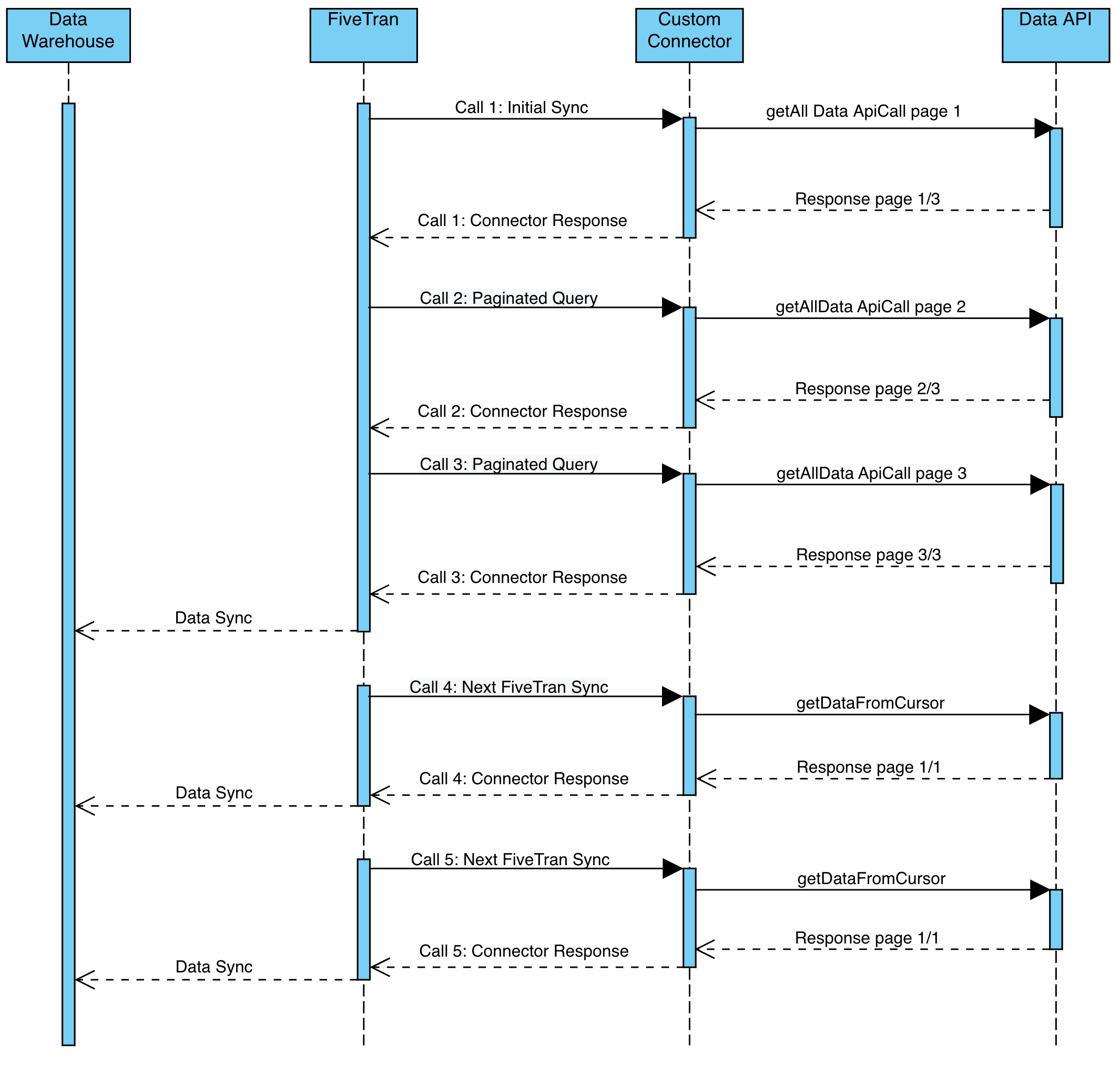
For the sake of this example and readability, the return JSON from the api call will be summarised as apiJsonResponse
Call 1: Initial Sync
FivetranCall
state: {}Connector Response
{
state: {
lastUpdate: ''
paginationCounter: 1
},
insert: {
apiJsonResponseTable: apiJsonResponse
},
schema: {
apiJsonResponseTable: {
primary_key: ['id']
}
},
hasMore: True
}
Initial API sync with no state, API call is getting all data with no state and has returned a paginated response
Key response features State:
- No
lastUpdateas paginated query has not been completed - Pagination Counter incremented + 1
hasMore = True
Call 2: Paginated Query 1
FivetranCall
state: {
lastUpdate: '',
paginationCounter: 1
}
Connector Response
{
state: {
lastUpdate: '',
paginationCounter: 2
},
insert: {
apiJsonResponseTable: apiJsonResponse
},
schema: {
apiJsonResponseTable: {
primary_key: ['id']
}
},
hasMore: True
}
Paginating through the API response for initial sync
Key response features State:
- No LastUpdate as paginated query has not been completed
- Pagination Counter incremented + 1
- hasMore = True
Call 3: Paginated Query 2
FivetranCall
state: {
lastUpdate: '',
paginationCounter: 2
}
Connector Response
{
state: {
lastUpdate: '2020-01-01',
paginationCounter: 0
},
insert: {
apiJsonResponseTable: apiJsonResponse
},
schema: {
apiJsonResponseTable: {
primary_key: ['id']
}
},
hasMore: False
}
Paginating through the API response for initial sync
Key response features State:
lastUpdateSet as paginated query has been completed- Pagination Counter set to 0, as paginated query is completed
- hasMore = false
Call 4: Next Fivetran Sync
FivetranCall
state: {
lastUpdate: '2020-01-01',
paginationCounter: 0
}
Connector Response
{
state: {
lastUpdate: '2020-01-02',
paginationCounter: 0
},
insert: {
apiJsonResponseTable: apiJsonResponse
},
schema: {
apiJsonResponseTable: {
primary_key: ['id']
}
},
hasMore: False
}
Fivetran Sync with LastUpdate State
Key response features State:
- LastUpdate updated, query has been completed
- Pagination Counter set to 0, as no pagination necessary
- hasMore = false
Call 5: Next Fivetran Sync
FivetranCall
state: {
lastUpdate: '2020-01-02',
paginationCounter: 0
}
Connector Response
state: {
lastUpdate: '2020-01-03',
paginationCounter: 0
},
insert: {
apiJsonResponseTable: apiJsonResponse
},
schema: {
apiJsonResponseTable: {
primary_key: ['id']
}
},
hasMore: False
})
}
Fivetran Sync with LastUpdate State
Key response features State:
lastUpdateupdated, query has been completed- Pagination Counter set to 0, as no pagination necessary
- hasMore = false
Examples
For a full working example see Fivetran's documentation
https://fivetran.com/docs/functions/aws-lambda/sample-functions
References
https://fivetran.com/docs/functions
If you have any questions or need help with setting up your own connector, feel free to poke us