Serving Operational Data from Snowflake: Hybrid Tables in Production
Snowflake is a data warehouse: you load data into it, transform it, and query it analytically. That's the pitch, and for most use cases it holds. So when a client asked us to use Snowflake as a low-latency operational serving layer - sub-300ms response times, up to 10 requests per second - we had questions.
Spoiler: it worked, but not without some pain.
This blog covers what we tried, what we built, and all the rough edges that didn't show up in the docs.
What we were building
The client was retiring a legacy system that served real-time operational data to an internal API. The goal was to lift that logic into Snowflake rather than rebuild it elsewhere.
The API hitting the old system would simply be repointed at Snowflake's SQL API (a stateless HTTP interface for querying Snowflake directly). No new infrastructure, no new services to operate.
The requirements were tight: average response time under 300ms, sustained at 10 requests per second in production.
Why not just use Postgres or Aurora? The honest answer: it would have worked, but the brief didn't allow for it. The data already lived in Snowflake, reverse-ETL to keep a 3.5M-row table in sync on a 10-minute cadence would have added a whole pipeline to build and operate, and there was no dedicated team to own a second database. Snowflake's SQL API meant the existing data layer could serve the use case without adding infrastructure. The cost argument also narrows considerably once you factor all that in - more on that later.
Interactive tables - close, but no
The obvious first candidate were Snowflake's interactive tables - a variant of dynamic tables optimised for low-latency reads using a dedicated interactive warehouse.
They get a lot right, latency is genuinely good and the execution model is familiar. However, there were three blockers for us:
-
Full refresh only. Interactive tables don't currently support incremental refresh. For a 3.5M-row table, that's a full scan every cycle. Fine for some use cases - not great when you're trying to minimise warehouse costs in non-production environments.
-
24/7 warehouse requirement. An interactive warehouse needs to stay running to serve queries without cold-start penalties. In production, that's acceptable. In development and staging environments, it's wasteful. Snowflake does offer a 10% discount for interactive warehouses, which softens the blow - but it still felt heavyweight for lower environments that see a fraction of the traffic.
-
Can't join with standard tables. Interactive warehouses can only query interactive tables. The moment you need to join fresh data from a standard table, you're blocked. And we did need to join fresh data - that was a hard requirement, not a nice-to-have.
There are promising things coming to interactive tables (single-row inserts are in the roadmap), but at the time, the constraints ruled them out.
Snowflake hybrid tables
Snowflake's hybrid tables store data in two formats simultaneously: row-based for fast transactional lookups, and column-based for analytical queries. This is Snowflake's play for HTAP (Hybrid Transactional/Analytical Processing) territory - a single system that handles both operational and analytical workloads.
A few things set them apart from standard Snowflake tables:
-
Index-based reads. Unlike standard tables which rely on partition pruning, hybrid tables support explicit indexes for point lookups (both primary - which is a requirements - and secondary). This is what makes sub-300ms single-row reads possible.
-
In-place updates via MERGE. You can update individual rows without rewriting a whole table. For a serving layer that refreshes every 10 minutes from upstream data, this is the right primitive.
-
Enforced constraints. Unique and referential integrity constraints are enforced, which matters for transactional workloads where you need to know a row exists before you reference it.
The architecture we built
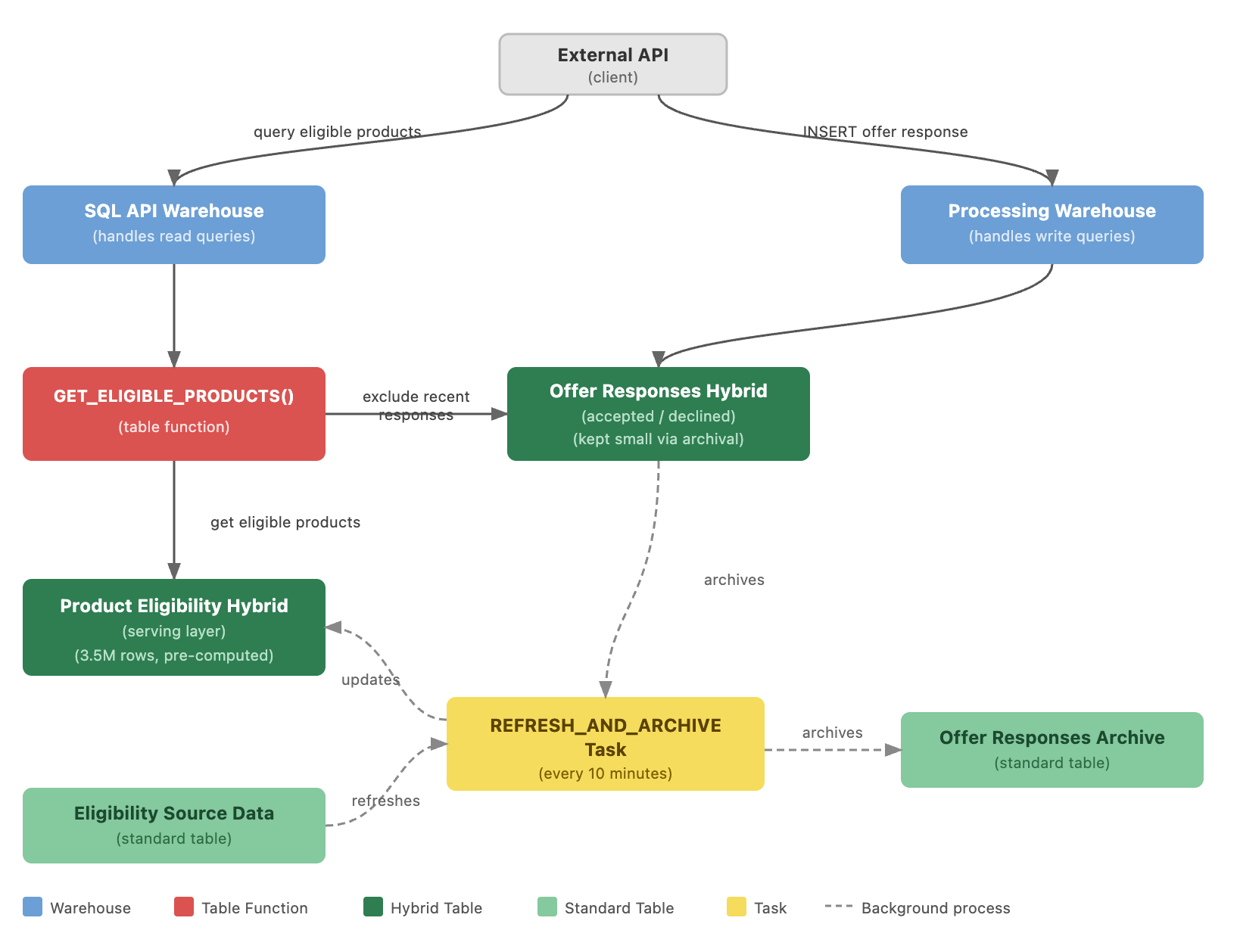
We ended up with two hybrid tables and a table function sitting in front of them.
-
The serving layer. A single hybrid table holding ~3.5M rows of pre-computed eligibility data. A Snowflake task runs every 10 minutes, using a MERGE statement to update only the rows that have changed - not a full reload. This keeps the refresh lightweight and predictable.
-
The fresh records table. A second, deliberately small hybrid table holding records that have arrived since the last refresh cycle. Because 10 minutes of lag means we'd be serving stale decisions for records that came in during that window, fresh responses are joined in at query time to apply any recent changes. This table gets archived into a standard table every 10 minutes as part of the same task cycle, keeping it small and the join cheap.
-
The table function. Both tables are accessed through a single table function. Callers query it like this:
SELECT column_a, column_b, column_c
FROM TABLE(GET_ELIGIBLE_PRODUCTS(:customer_id))
The :customer_id bind parameter gets resolved inside the function, which performs the index lookup against both hybrid tables and returns the merged result. The SQL API handles the rest.
Why wrap it in a table function? Two reasons - and the second one surprised us. More on that in the gotchas.
The gotchas
This is the section I wish had existed before we started.
Several of these required Snowflake escalations, and at least one required Snowflake to intervene at the infrastructure level.
The query cache will return the wrong customer's data.
Snowflake caches query results based on query text only - bind parameters are ignored entirely. Two users querying with different customer IDs but the same parameterised SQL will get the same cached result. In practice, that means user A could receive user B's eligibility data. The fix: embed the customer UUID directly in the SQL string rather than using bind parameters.
-- BAD: Snowflake treats these as identical queries, returns cached result
SELECT * FROM TABLE(GET_ELIGIBLE_PRODUCTS(?))  -- bind param ignored by cache

-- GOOD: UUID in the string = unique query text = no cache collision
SELECT * FROM TABLE(GET_ELIGIBLE_PRODUCTS('a3f2e1d0-...'))
Since the UUID is now in the query string, validate it against a strict UUID format before constructing the SQL. This isn't optional - it's the injection guard that makes the approach safe.
Masking policies silently break index lookups.
When a masking policy is applied to a column that's part of a hybrid table index, Snowflake switches from ROW_BASED scan mode to COLUMN_BASED. That bypasses the index entirely and falls back to a full column scan - a massive performance regression you won't see coming until you deploy to an environment where masking policies are actually active (which, in our case, was production).
The fix is to effectively remove masking from the indexed columns. We created a CLASSIFICATION_EXEMPT tag with no masking policy attached and applied it to those columns only - all other tags in the platform still carry masking policies. This restores ROW_BASED scan mode and returns latency to the expected range.
The obvious downside: those columns are now unmasked. The compensating control is to restrict access to the hybrid table itself to only the roles that need it - tighter RBAC rather than column-level masking. It's a valid trade-off, but go in with eyes open.
Top-of-hour latency spikes - and it wasn't the warehouse.
At the top of each hour, we observed query latency jumping from 200-300ms to 400-600ms. The instinct is to blame the warehouse - but query execution time was ~16ms. The spikes were entirely in cloud services: compilation taking ~200ms, request receipt taking ~350ms. No data was being scanned.
Root cause: shared cloud services capacity experiencing contention at hour boundaries from other activity across the Snowflake platform. The warehouse was irrelevant. Resolved by Snowflake provisioning a dedicated cloud services tenancy for the account - something that requires an escalation, not a configuration change.
Table function predicate pushdown - the non-obvious one.
When we first queried the serving hybrid table joined with the fresh records table, Snowflake was doing a full table scan instead of using the index. The customer ID predicate wasn't being pushed down through the join - Snowflake couldn't prove the filter would only touch a small number of rows, so it scanned everything.
Wrapping the query in a table function changed the behaviour. Snowflake treats the table function as a single operation with a known lookup signature, which forces it to use the row-based index and perform a targeted lookup. This was the key optimisation that brought hybrid table performance close to parity with interactive tables.
SQL API rate limiting isn't warehouse-bound.
The SQL API is stateless - every request creates a new session. That means every request goes through auth, query compilation, routing, and execution from scratch. At low volumes that's fine. At 10 requests per second sustained, the Cloud Services layer starts to feel it before the warehouse does. We hit 429 (TooManyRequests) and 503 (ServiceUnavailable) errors under peak load.
The instinct is to scale up the warehouse. It doesn't help - the bottleneck is upstream of it. Cloud Services is a shared layer handling session management and compilation for the whole account, and it has its own limits independent of warehouse size.
A few things that do help:
- Retry with exponential backoff. 429s and 503s are transient. A well-implemented retry loop with jitter handles most burst scenarios without any architectural changes.
- Batch writes where you can. If your write path is hitting the SQL API individually for each record, that's avoidable overhead. Combine records into fewer, larger statements.
- Consider a Snowflake connector for high-throughput paths. If the stateless model is genuinely the bottleneck, switching from raw SQL API to a Snowflake driver (Python connector, JDBC) gives you persistent sessions and connection pooling - at the cost of a more complex integration layer.
If you're expecting sustained high concurrency, test this early. It's not a problem you'll see in light integration testing.
No Terraform or dbt support.
Neither hybrid tables nor interactive tables are first-class citizens in Terraform or dbt (at the time of writing). We used snowflake_execute resources for anything that needed Terraform. Furthermore, our hybrid table resources exist outside the dbt lineage graph, which means they're invisible to the catalog and out of the normal deployment flow. If your platform is heavily dbt-driven, expect friction.
Cold starts matter more than you'd expect.
If traffic drops off - overnight, over a weekend - the hybrid table warehouse will cold-start on the next request. Cold starts on hybrid tables can add several seconds to response time. In production, we ended up increasing the autosuspend timeout significantly to keep the warehouse warm and prioritise consistent latency over cost savings.
In lower environments, though, this is actually where hybrid tables have a clear advantage over interactive tables. Interactive warehouses need to stay running to serve queries at all times - you're paying for uptime whether or not anything is hitting them. With hybrid tables, you can let the warehouse suspend and accept the occasional cold start. For development and staging traffic patterns, that trade-off is entirely reasonable.
Performance results
Before committing to this architecture in production, we ran performance tests on representative data volumes - not the full 3.5M rows, but a proportionally sized sample. The results were clear enough to guide the decision.
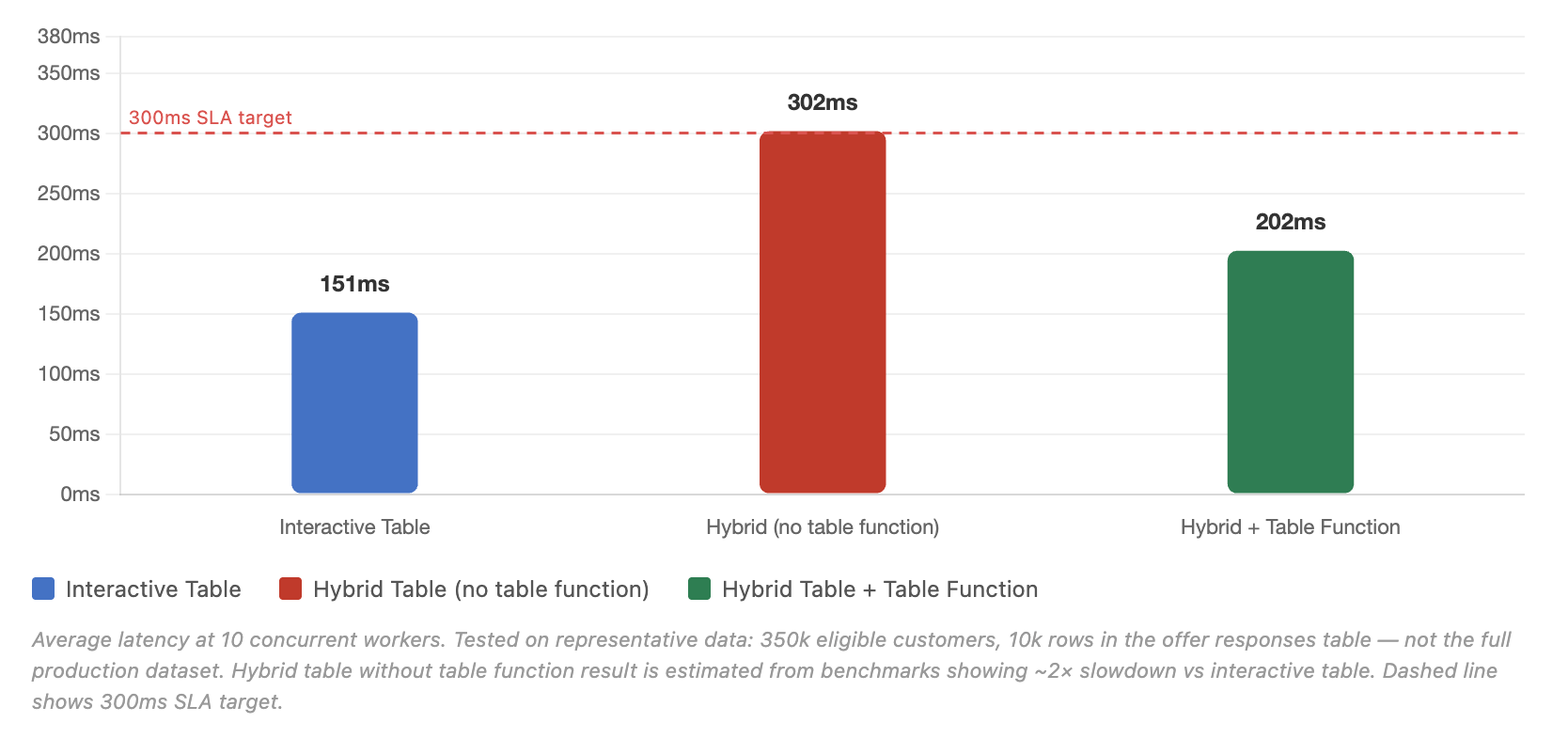
Interactive tables hit approximately 150ms average - well inside the 300ms target.
Hybrid tables without the table function came in around 300ms - right at the boundary, and degrading under load as concurrent requests increased. Not viable.
Hybrid tables with the table function came in around 200ms - close to interactive table parity, and consistent. That's the table function forcing index-based lookups rather than column scans.
One area where hybrid tables have a meaningful advantage: the serving warehouse can be configured as multi-cluster, automatically adding clusters to absorb traffic spikes. Interactive warehouses have no equivalent dynamic auto-scaling - you can spin up more of them manually, but nothing scales up or down on its own in response to load. For workloads with variable, spiky concurrency, that's a real difference.
The other side of that trade-off is worth being honest about: interactive tables scale better as concurrency increases, if you're willing to size and manage that scaling yourself. In our testing, interactive table latency stayed flat regardless of load, while hybrid tables - even with the table function in place - showed growing tail latency (p95/p99) as concurrent requests went up. At our production volume of 10 requests per second, hybrid tables keep up comfortably. But this isn't a story where hybrid tables win outright - at 50 requests per second, interactive tables would pull decisively ahead, so long as you've provisioned enough warehouse capacity to handle it. If your workload doesn't need to join fresh data at query time and you're comfortable managing that capacity by hand rather than relying on autoscaling, interactive tables are the better bet at higher scale.
Cost: the honest napkin maths
We didn't choose Snowflake because it was cheaper. Rather, we chose it because the data already lived there and the brief was to stay in one system. If your primary driver is cost then a purpose-built operational database will still win on raw compute every time.
That said, here's what we're actually running. In the Sydney AWS region, Enterprise tier Snowflake costs USD $4.05 per credit. An X-Small warehouse consumes 1 credit per hour. We have two - one for reads, one for writes - so that's around USD $5,800/month at 24/7. We may yet consolidate into a single warehouse (haven't had the chance to validate the latency impact), which would bring it to around USD $2,900/month. X-Small was more than sufficient for our workloads.
For comparison, an Aurora PostgreSQL db.r6g.large in the same region runs at USD $0.3130/hr - roughly USD $225/month. Cheaper, yes. But that number doesn't include a reverse-ETL pipeline to keep 3.5M rows in sync from Snowflake, an API layer to serve queries (SQL API is included with Snowflake), or the operational overhead of running a second system.
If your data already lives in Snowflake, the total cost of ownership comparison is less lopsided than the compute numbers suggest. If it doesn't - and you'd be building sync infrastructure either way - a dedicated operational store is probably the right call.
Takeaways
Snowflake hybrid tables in production work. The performance is genuinely usable for operational serving workloads. But this is not Snowflake's primary use case - and you will feel that.
Use this approach when your data already lives in Snowflake. If you're going to build a reverse-ETL pipeline and operate a separate database anyway, there's a reasonable argument for a purpose-built operational store. But if the data is already in Snowflake and you need low-latency serving, staying in one system is the simpler path.
The table function is not optional. Without it, you're not using the index. Make that decision explicitly rather than discovering it after deployment.
Go in expecting escalations. The masking policy issue, the top-of-hour spikes, and the dedicated cloud services tenancy all required opening tickets with Snowflake support. None of them were self-service fixes. If your team has a Snowflake account team, keep them in the loop early.
Don't skip the performance testing. Representative data, load testing at target concurrency, in a real Snowflake environment. The gap between interactive and hybrid (pre-optimisation) was significant enough that we would have made a different architectural choice had we not run the tests.
Here at Mechanical Rock, we build and operate data platforms - including the kinds that need to do things data platforms aren't supposed to do.
If you're pushing Snowflake into operational territory and want a second pair of eyes over it, get in touch