Malware-Protected File Upload with S3 and GuardDuty: a Full-Stack Example

User file uploads are one of those tricky features that can quickly blow out our project’s deadlines if we’re not careful. Cloud services like Amazon S3 make the file storage part easy, but the upload process itself can still make things complicated!
As soon as you let users pass files into your application, and especially if those files can be shared with other users, we suddenly have half-a-dozen tricky new problems to consider. Thankfully, the right tools can do a lot of the heavy lifting for us - if we know what to look for. I’ll be using AWS, Terraform, and JavaScript in our example here, but you’ll find many comparable solutions with other vendors as well.
See code snippets below, and a full working PoC demo on our GitHub repo!
Our Problem(s)
File uploads give our users a lot of freedom, which is complexity for us - more freedom means more edge cases to handle. The problem is that a user could, in theory, upload just about anything to our website. This means:
- The file could make no sense for your application
- Files could contain viruses
- Files could be too large
- Users could upload too many files
One way to address a lot of these problems would be to not upload the file directly to storage, but instead to our server. Once we control it there, we can check the type, contents, size, rename it, or whatever else we want. But this is a lot for our server to handle; files must be loaded into RAM, so it’s easy to run into out-of-memory errors or big scaling costs if too many files (or even a few large ones) are uploaded simultaneously. This also increases the attack surface of our application, since our server is now processing arbitrary files.
We’ll be using two principal AWS features to address these problems: GuardDuty Malware Protection for S3, and S3 Pre-signed URLs. Let’s give these a quick look:
AWS GuardDuty Malware Protection for S3
AWS GuardDuty Malware Protection for S3 is quite the mouthful, but it will let us do automatic malware scanning of files uploaded to our S3 buckets and then react to the result. The way we do this is pretty simple: First, we define a protection plan on our bucket. This will automatically scan any new objects added to the bucket for viruses, and then produce an EventBridge event with the result. We can then listen to this event to react to the result of the scan with compute of our choice.

S3 Pre-signed URLs
S3 pre-signed URLs let us offload the very heavy lifting of handling user-provided files directly from our web server onto S3. The idea is that instead of passing files to our server and then to S3, we just pass the file to S3 directly. The way we do this is by getting the server to generate a pre-signed URL for our bucket - a URL with one-time credentials attached that say “this URL may be used to upload one file to this bucket”. The great thing about pre-signed URLs is the extra validation parameters you can add to them: you can give the URL an expiry, denote a required key, maximum file size, and much more. This will help a lot in managing and securing our upload!
⚠️ Note - Pre-signed URLs have the permissions of the principal that created them at the time the URL is used, not when it is created. This means that if the principal's permissions change, so do those of the pre-signed URL. But more dangerously: if pre-signed URLs are generated by an IAM role and the role credentials expire, the pre-signed URL becomes invalid!
This isn't so important for a simple file upload/download page where we only use the URLs once immediately after they're generated, but really important if you need your pre-signed URLs to live longer. You can get around this by generating them with an IAM user, which won't expire.
Our final Architecture
Now that we have our ingredients, let's see what we can cook! For our example app, we'll build a simple page where users can share documents. We will need to malware-scan files (since they are shared), and we will only allow PDF file uploads.
Our upload architecture has only a few pieces: two buckets, 2 event handlers, and GuardDuty. I've removed extra components like EventBridge and Cloudfront to stay focused, but any production-ready solution needs those too.
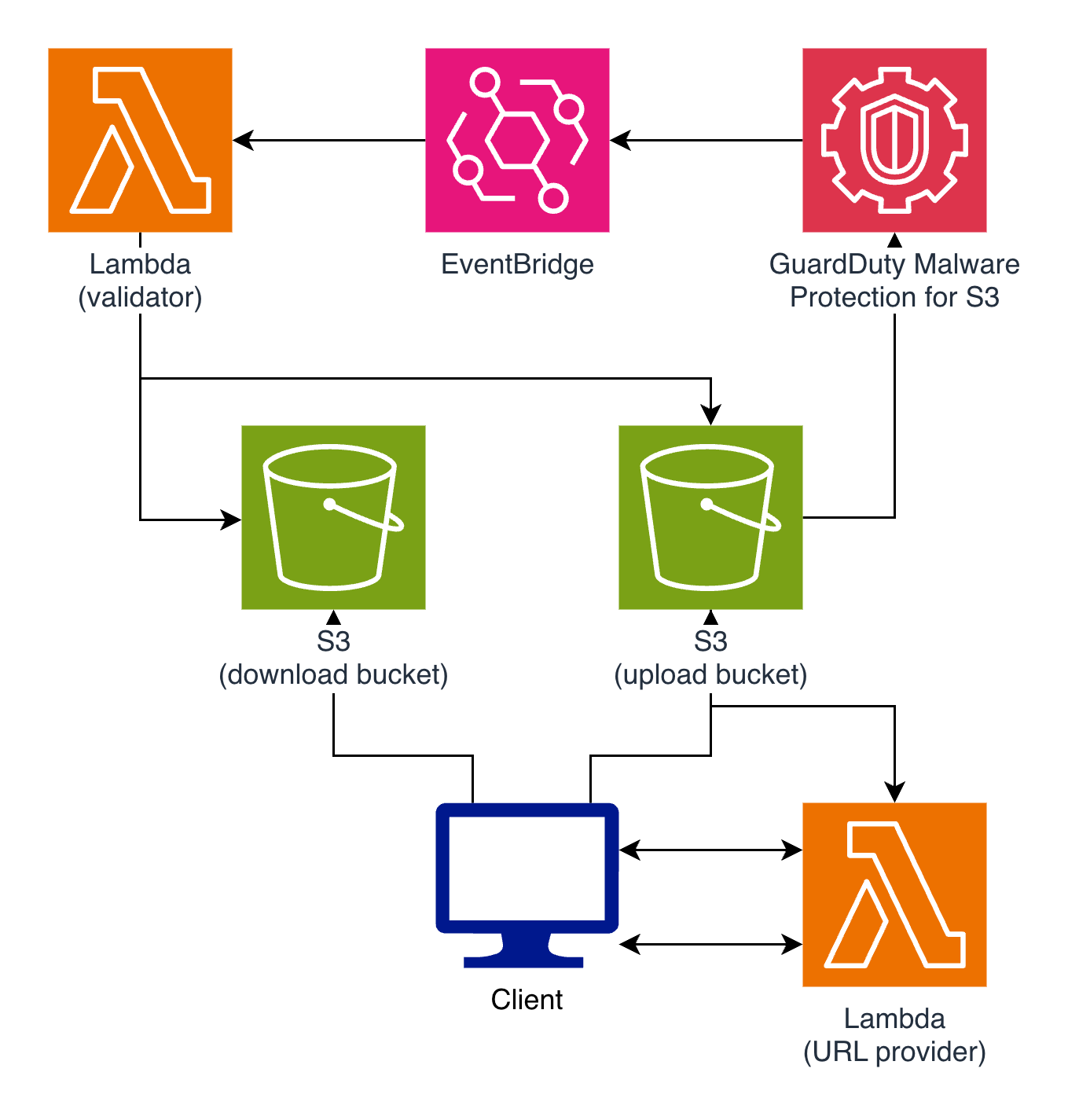
The idea behind having two buckets is simple - the first bucket (upload) is our "unverified" bucket, which is where users will upload their files with pre-signed URLs. We don't trust files here because they haven't yet been scanned! We configure our GuardDuty policy on this bucket, and trigger a Lambda with the result of the scan - if the file is safe, Lambda can then move the file into our "trusted" bucket (download), where we can safely allow other users to download it.
💡 Note - We could achieve all of this within a single bucket, and this could be a completely valid architecture! However, I feel using two buckets gives us the best clarity about which files are safe and which ones are not, and makes adjusting policies simpler later.
Let's dive into more detail on the two key parts:
Using Pre-signed URLs to validate file input
Let's create an API endpoint for our users that returns a pre-signed URL:
app.post("/api/presign-upload", async (c) => {
  const body = await c.req.json();
  const filename = body.filename;

  if (!isPdf(filename)) {
    return c.json({ error: "Only .pdf files are allowed in this demo." }, 400);
  }

  const key = generateUniqueID(filename);
  const presignedPost = await createPresignedPost(s3, {
    Bucket: process.env.UPLOAD_BUCKET_NAME,
    Key: key,
    Expires: 300,
    Fields: {
      key,
      "Content-Type": "application/pdf",
      "x-amz-meta-file_name": filename,
    },
    Conditions: [
      ["content-length-range", 1, MAX_UPLOAD_BYTES],
      { key },
      { "Content-Type": "application/pdf" },
      { "x-amz-meta-file_name": filename },
    ],
  });

  return c.json({
    uploadUrl: presignedPost.url,
    uploadFields: presignedPost.fields,
    key,
    expiresInSeconds: 300,
  });
});
Using pre-signed URLs gives us a ton of validation power here! Since clients have to request the URL to make an upload in the first place, we can enforce a number of things:
- If we don't like the name or extension of the file the client wants to upload (e.g. non-
.pdffiles), we can reject the request outright. - We can generate the pre-signed URL with the
x-amz-meta-file_nameparameter, effectively holding our users to the file name they provide here. - We probably don't want to be using the file name as the bucket key, and instead use some kind of primary key - we can enforce that by setting the bucket upload key in the presigned URL.
- We don't want files larger than 100MB, so we'll add a
content-length-rangeto any pre-signed URLs we provide.
To trigger the upload, you'll need to make two requests from the frontend - a first one to retrieve the pre-signed URL, and then another to perform the upload. A bit finicky, but nothing we can't handle with our favourite flavour of JS (in this case, vanilla):
  const presignResponse = await fetch("/api/presign-upload", {
    method: "POST",
    headers: { "Content-Type": "application/json" },
    body: JSON.stringify({
      filename: selectedFile.name,
      contentType: selectedFile.type || "application/pdf",
      sizeBytes: selectedFile.size,
    }),
  });

  if (!presignResponse.ok) {
    const errorBody = await presignResponse.json().catch(() => ({}));
    throw new Error(errorBody.error || `Failed to create upload URL: ${presignResponse.status}`);
  }

  const presignPayload = await presignResponse.json();

  // S3 presigned POST expects a form body
  const formData = new FormData();
  Object.entries(presignPayload.uploadFields || {}).forEach(([fieldName, fieldValue]) => {
    formData.append(fieldName, fieldValue);
  });
  formData.append("file", selectedFile);

  const uploadResponse = await fetch(presignPayload.uploadUrl, {
    method: "POST",
    body: formData,
  });
💡 Note - While presigned URL generation has no rate limits, S3 bucket operations do. If you're expecting high traffic on your bucket, keep in mind bucket operations are rate-limited by prefix, not by bucket. For example, this means the current 3,500/second POST limit would apply separately for two prefixes on the same bucket, giving you an effective rate of 7000 POST requests per second. Take advantage of this by prefixing objects with categories like associated user ID. See https://docs.aws.amazon.com/AmazonS3/latest/userguide/optimizing-performance.html for more information.
Scanning and Vetting with GuardDuty + an Event Handler
GuardDuty Malware Protection is our secret sauce. To enable it, we'll need to create some infrastructure. Namely, we'll need a GuardDuty malware protection plan, an execution role for that plan, and permissions to glue it all together.
Apologies for the wall of code ahead:
resource "aws_iam_role" "guardduty_execution_role" {
  name = "${local.name_prefix}-guardduty-execution"

  assume_role_policy = jsonencode({
    Version = "2012-10-17",
    Statement = [
      {
        Effect = "Allow",
        Principal = {
          Service = "malware-protection-plan.guardduty.amazonaws.com"
        },
        Action = "sts:AssumeRole"
      }
    ]
  })
}

resource "aws_iam_role_policy" "guardduty_execution_policy" {
  name = "${local.name_prefix}-guardduty-execution-policy"
  role = aws_iam_role.guardduty_execution_role.id

  policy = jsonencode({
    Version = "2012-10-17",
    Statement = [
      {
        Sid    = "AllowManagedRuleToSendS3EventsToGuardDuty",
        Effect = "Allow",
        Action = [
          "events:PutRule",
          "events:DeleteRule",
          "events:PutTargets",
          "events:RemoveTargets"
        ],
        Resource = [
          "arn:aws:events:${var.aws_region}:${data.aws_caller_identity.current.account_id}:rule/DO-NOT-DELETE-AmazonGuardDutyMalwareProtectionS3*"
        ],
        Condition = {
          StringLike = {
            "events:ManagedBy" = "malware-protection-plan.guardduty.amazonaws.com"
          }
        }
      },
      {
        Sid    = "AllowGuardDutyToMonitorEventBridgeManagedRule",
        Effect = "Allow",
        Action = ["events:DescribeRule", "events:ListTargetsByRule"],
        Resource = [
          "arn:aws:events:${var.aws_region}:${data.aws_caller_identity.current.account_id}:rule/DO-NOT-DELETE-AmazonGuardDutyMalwareProtectionS3*"
        ]
      },
      {
        Sid      = "AllowPostScanTag",
        Effect   = "Allow",
        Action   = ["s3:PutObjectTagging", "s3:GetObjectTagging", "s3:PutObjectVersionTagging", "s3:GetObjectVersionTagging"],
        Resource = ["${aws_s3_bucket.upload.arn}/*"]
      },
      {
        Sid      = "AllowEnableS3EventBridgeEvents",
        Effect   = "Allow",
        Action   = ["s3:PutBucketNotification", "s3:GetBucketNotification"],
        Resource = [aws_s3_bucket.upload.arn]
      },
      {
        Sid      = "AllowPutValidationObject",
        Effect   = "Allow",
        Action   = ["s3:PutObject"],
        Resource = ["${aws_s3_bucket.upload.arn}/malware-protection-resource-validation-object"]
      },
      {
        Sid      = "AllowCheckBucketOwnership",
        Effect   = "Allow",
        Action   = ["s3:ListBucket"],
        Resource = [aws_s3_bucket.upload.arn]
      },
      {
        Sid      = "AllowMalwareScan",
        Effect   = "Allow",
        Action   = ["s3:GetObject", "s3:GetObjectVersion"],
        Resource = ["${aws_s3_bucket.upload.arn}/*"]
      }
    ]
  })
}

resource "aws_guardduty_malware_protection_plan" "upload_bucket_plan" {
  role = aws_iam_role.guardduty_execution_role.arn

  protected_resource {
    s3_bucket {
      bucket_name = aws_s3_bucket.upload.bucket
    }
  }

  actions {
    tagging {
      status = "ENABLED"
    }
  }
}
⚠️ Note - Make sure that the GuardDuty execution policy matches exactly!
Our S3 object scans emit EventBridge events on completion (more details here). We'll need to listen to these and trigger our Lambda handler:
resource "aws_cloudwatch_event_rule" "guardduty_scan_result" {
  name        = "${local.name_prefix}-guardduty-scan-result"
  description = "Triggers Lambda on GuardDuty malware protection scan result events"

  event_pattern = jsonencode({
    source        = ["aws.guardduty"],
    "detail-type" = ["GuardDuty Malware Protection Object Scan Result"],
    detail = {
      s3ObjectDetails = {
        bucketName = [aws_s3_bucket.upload.bucket]
      }
    }
  })
}

resource "aws_cloudwatch_event_target" "on_scan_target" {
  rule      = aws_cloudwatch_event_rule.guardduty_scan_result.name
  target_id = "OnScanLambda"
  arn       = aws_lambda_function.on_scan.arn
}

resource "aws_lambda_permission" "allow_eventbridge_invoke_on_scan" {
  statement_id  = "AllowExecutionFromEventBridge"
  action        = "lambda:InvokeFunction"
  function_name = aws_lambda_function.on_scan.function_name
  principal     = "events.amazonaws.com"
  source_arn    = aws_cloudwatch_event_rule.guardduty_scan_result.arn
}
Downloading
Finally, our Lambda handler reads in the scan result, and deals with the file accordingly:
const handler = async (event) => {
  console.log("Received GuardDuty event:", JSON.stringify(event));

  const detail = event?.detail || {};

  const status = detail?.scanResultDetails?.scanResultStatus;
  if (status !== "NO_THREATS_FOUND") {
    console.log("Scan result is not NO_THREATS_FOUND. Not moving object.");
    return;
  }

  const sourceKey = detail?.s3ObjectDetails?.objectKey;
  if (!isPdfKey(sourceKey)) {
    console.log(`Object ${sourceKey} is not a PDF. Not moving object.`);
    return;
  }

  const sourceKeyDecoded = decodeURIComponent(sourceKey.replace(/\+/g, " "));

  const head = await s3.send(
    new HeadObjectCommand({
      Bucket: uploadBucket,
      Key: sourceKeyDecoded,
    }),
  );

  await s3.send(
    new CopyObjectCommand({
      Bucket: DOWNLOAD_BUCKET_NAME,
      Key: sourceKeyDecoded,
      CopySource: `${UPLOAD_BUCKET_NAME}/${encodeURIComponent(sourceKeyDecoded)}`,
      ContentType: head.ContentType,
      MetadataDirective: "COPY",
    }),
  );

  await s3.send(
    new DeleteObjectCommand({
      Bucket: UPLOAD_BUCKET_NAME,
      Key: sourceKeyDecoded,
    }),
  );

  console.log(`Moved clean PDF from ${uploadBucket}/${sourceKeyDecoded} to ${downloadBucket}/${sourceKeyDecoded}`);
};
💡 Note - I've used Lambda for handling the GuardDuty result here, but if you have an existing application system that supports scheduled tasks, consider using SQS instead. That way your existing system can poll SQS for file upload events, and you can respond to events however you want with your existing libraries and database connection.
Handling downloads
When users want to download the file later, we just generate another pre-signed URL:
app.post("/api/presign-download", async (c) => {
  const body = await c.req.json();
  const key = body.key;

  // Verify the file exists and read original filename from object metadata
  const head = await s3.send(
    new HeadObjectCommand({
      Bucket: process.env.DOWNLOAD_BUCKET_NAME,
      Key: key,
    }),
  );

  const metadataFilename = head.Metadata?.file_name || head.Metadata?.filename;
  const encodedFilename = encodeURIComponent(metadataFilename);

  const command = new GetObjectCommand({
    Bucket: process.env.DOWNLOAD_BUCKET_NAME,
    Key: key,
    ResponseContentDisposition: `attachment; filename="${metadataFilename}"; filename*=UTF-8''${encodedFilename}`,
  });

  const downloadUrl = await getSignedUrl(s3, command, { expiresIn: 300 });

  return c.json({
    downloadUrl,
    expiresInSeconds: 300,
  });
});
Just like for uploads, our download becomes a two-part request on the client side - one to get the pre-signed URL, and one to actually download from it.
And there you have it! Malware-scanned, scalable file upload to S3, all handled with Terraform in AWS. Try it yourself with the full proof-of-concept repository here. If you'd like to try the malware scanning for yourself, you could try using the EICAR antivirus test file.
Looking for a full solution?
The individual concepts covered in this post may be straightforward, but even in this small demo we can see the balancing it all between performance, security, and complexity becomes challenging!
At Mechanical Rock, finding the right solutions to your complex software problems is our specialty. If you have challenges we can help you with, get in touch with us today!!