Making Iceberg Work on AWS: Architecture, Automation, and Analytics
We recently built a data pipeline to ingest data from various APIs into AWS, making it easily accessible and queryable by multiple teams. To achieve this, we used AWS Fargate to pull data from APIs, stored it in S3, and leveraged Apache Iceberg to add structure and enable analytics capabilities.
While Iceberg wasn't a strict requirement, we chose it to provide a structured layer over raw S3 data and unlock advanced analytics features. However, deploying Iceberg effectively in a native AWS environment involves navigating several architectural decisions and trade-offs.
This post walks through the practical aspects of deploying and operating Iceberg on AWS - covering the architectural options we evaluated, the trade-offs we encountered, and the solutions we ultimately implemented.
Project Overview
Our initial focus was on Power BI access, with plans to support Databricks in the future, so interoperability was a key consideration from the start.
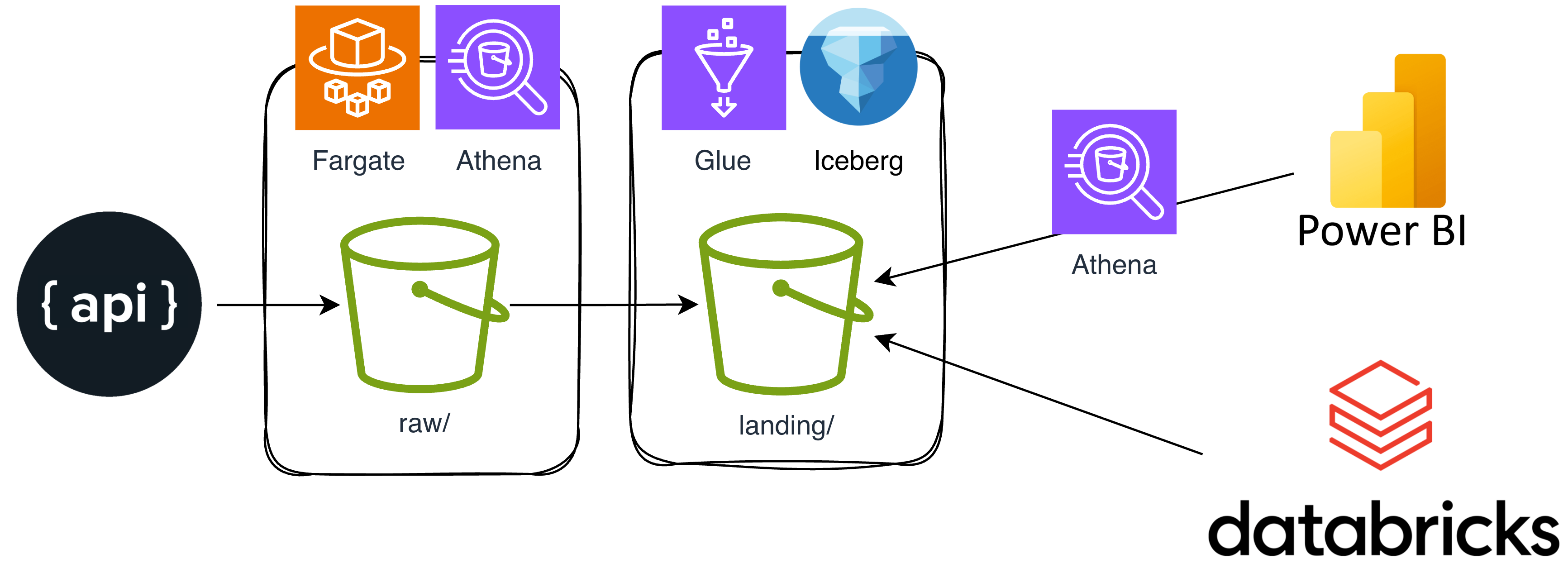
We chose AWS Fargate for its serverless simplicity and Terraform to automate infrastructure provisioning, keeping the setup maintainable and repeatable.
The solution consisted of two main components:
- Ingestion logic – A Python application running in Fargate
- Infrastructure – Managed with Terraform
Our CI/CD pipeline builds the application into a Docker container, pushes it to ECR, and then uses Terraform to deploy the necessary AWS resources, including the Fargate task and EventBridge schedule.
Throughout the project, we prioritized simplicity and maintainability to make it easy for other teams to understand, operate, and extend the solution. The diagram below shows the overall architecture and key components:
Why Apache Iceberg
Apache Iceberg has quickly become the go-to table format for modern data lakes - and for good reason. It brings structure and powerful features to your data lake, allowing you to layer a table abstraction over collections of files without the need for a full data platform. One of Iceberg’s biggest strengths is interoperability: multiple query engines can access and manipulate the same data seamlessly.
As an Open Table Format (OTF), Iceberg acts as a metadata layer on top of your data files, using supporting files such as:
- Metadata files to track table state, schema changes, and partition evolution
- Manifest lists to reference manifests for a snapshot
- Manifest files to summarize partitions and provide file-level statistics
Key reasons to adopt Iceberg include:
- Cross-platform and multi-engine support
- Familiar SQL interface for querying and data manipulation
- Schema and partition evolution without rewriting tables
- Built-in versioning, time travel, and rollback
- Safe handling of concurrent reads and writes
Iceberg’s design makes it possible to build robust, flexible, and future-proof data architectures - especially in environments where multiple tools and teams need to work with the same underlying data.
Iceberg drawbacks
Despite its advantages, Iceberg comes with some trade-offs. Managing Iceberg tables adds operational complexity compared to simply querying raw files in S3. Tables rely on a catalog (like AWS Glue) and generate metadata, manifest, and snapshot files that require ongoing maintenance - without regular cleanup, metadata can accumulate and slow down query planning.
Interoperability, while a core goal, is more mature for reads than for writes. Write support and semantics can differ between engines, often leading teams to standardise on a single engine for writes and use others mainly for querying.
There are also cost implications on AWS: Iceberg increases S3 API calls and storage usage due to metadata and snapshot retention. Finally, as a relatively young ecosystem, Iceberg requires specialised knowledge to operate effectively, which can slow adoption for some teams.
Solution on AWS
With AWS as our core platform, we explored several approaches for implementing Iceberg tables.
S3 tables
Amazon S3 tables are a relatively new feature that make Apache Iceberg tables natively available in S3, eliminating the need to manage Iceberg directly. The main advantage is that AWS handles table maintenance for you - there’s no need to manually run compaction, manage snapshots, or clean up unused files.
However, exposing S3 tables to query engines like Athena requires Lake Formation, which currently involves some manual setup in the AWS UI and cannot be fully automated.
We also encountered several limitations with S3 tables and Terraform:
- Only primitive types are supported (no STRUCTs or other complex types)
- No schema evolution - adding a column recreates the table instead of altering it (a Terraform limitation)
- To avoid unwanted table recreation, you can add ignore_changes to metadata and manage schema changes elsewhere, such as in Athena:
  lifecycle {
    ignore_changes = [metadata]
  }
Finally, interoperability between S3 tables and Databricks is limited. Since we wanted to eventually access these tables from Databricks, we decided against using S3 tables for our solution.
Glue
Because Iceberg tables require a catalog to manage metadata and enable interoperability across engines, we initially looked at AWS Glue as the natural choice on AWS. However, we quickly encountered a key limitation: Iceberg tables cannot be created using native Glue Catalog table definitions via Terraform. This is because Iceberg’s metadata layer must be initialized by an Iceberg-aware compute engine (such as Athena, EMR Spark, or the Iceberg AWS library), which goes beyond Glue’s declarative schema capabilities.
To work around this, we tried an infrastructure-as-code approach using Terraform’s null_resource with local-exec provisioners to run Athena DDL queries, allowing us to initialize the Iceberg metadata structure while keeping table definitions in version control. While this hybrid method works, it’s less declarative and adds complexity.
Ultimately, we moved away from this approach. Since we were already using Python for our main logic, we shifted to creating Iceberg tables via Athena directly from the app. This works well for infrequent runs, but for more frequent ingestion, we’d likely separate table creation and ingestion into distinct tasks.
Amazon Athena
Ultimately, we performed most of our operations using Amazon Athena. Our Python task generated the necessary SQL for table creation and submitted it to Athena, polling asynchronously for results - which were nearly instantaneous for empty tables.
A typical Athena query to create an Iceberg table looked like this:
CREATE TABLE IF NOT EXISTS landing.source_table (
  id int COMMENT 'Unique identifier (primary key)',
  objectType string COMMENT 'Object type',
  ...
  _ingested_at timestamp(3) COMMENT 'Timestamp when record was loaded into Iceberg',
  _source_file string COMMENT 'Full S3 path to the source file',
  _is_current boolean COMMENT 'True if this is the current version of the record',
  _valid_from timestamp(3) COMMENT 'Timestamp when this version became valid',
  _valid_to timestamp(3) COMMENT 'Timestamp when this version was superseded (NULL for current)'
)
COMMENT 'Table comment'
LOCATION 's3://iceberg-bucket/landing/source/table/'
TBLPROPERTIES (
  'table_type'='ICEBERG',
  'format'='parquet',
  'write_compression'='snappy'
)
We also used Athena for ingestion. The Python script extracted data from the API and loaded it into S3 in its raw form (e.g., in raw/{source_name}/{endpoint_name}). We then implemented a four-step process to support slowly changing dimensions (SCD2), ensuring that duplicate records were not created when the same data was received from the APIs.
Step 1: Create an external table (worked like a dream with JSON files)
CREATE EXTERNAL TABLE IF NOT EXISTS raw.temp_source_table (
  id int, objectType string,
  ...
)
ROW FORMAT SERDE 'org.openx.data.jsonserde.JsonSerDe'
LOCATION 's3://riceberg-bucket/raw/source/table/20260128_155042/'
Step 2: Execute a merge operation to invalidate old rows if changed
MERGE INTO landing.source_table AS target
USING (
  SELECT *
  FROM (
      SELECT *, ROW_NUMBER() OVER (PARTITION BY id) AS rn, "$path" as source_path
      FROM raw.temp_source_table
  ) s
  WHERE s.rn = 1
) AS source
ON target.id = source.id AND target._is_current = true
WHEN MATCHED AND (COALESCE(target.objectType, NULL) <> (COALESCE(source.objectType, NULL)) OR ... ) THEN
    UPDATE SET
        _is_current = false,
        _valid_to = current_timestamp
We use COALESCE here to make the comparison between source and target columns NULL safe. In SQL, direct comparisons involving NULLs do not behave as expected - NULL is not equal to anything, not even another NULL. By wrapping both sides of the comparison with COALESCE, we ensure that two NULLs are treated as equal, and a NULL on one side and a value on the other are treated as different.
This logic is crucial for implementing slowly changing dimensions (SCD2) in our ingestion process. We only want to update the state of an existing record if the new version has actually changed - if all relevant fields remain the same (including handling of NULLs), we avoid unnecessary updates. This prevents data from being reingested or duplicated during full loads from the source (for example, when an API endpoint returns all records every time, not just the changed ones). As a result, our table remains clean, efficient, and only reflects true changes in the source data.
Step 3: Insert new records
INSERT INTO landing.source_table (id, objectType, ..., _ingested_at, _source_file, _is_current, _valid_from, _valid_to)
SELECT (id, objectType, ..., current_timestamp, source.source_path, true, current_timestamp, CAST(NULL AS timestamp(3)))
FROM (
  SELECT *, ROW_NUMBER() OVER (PARTITION BY id) AS rn, \"$path\" as source_path
  FROM raw.temp_source_table
) source
LEFT JOIN landing.source_table target
  ON target.id = source.id AND target._is_current = true
WHERE source.rn = 1 AND (
  target.id IS NULL
  OR (COALESCE(target.objectType, NULL) <> (COALESCE(source.objectType, NULL))) OR ...
  )
Step 4: Post ingestion, drop the external table
DROP TABLE IF EXISTS raw.temp_source_tableKeeping the raw data as it comes from the API also had its benefits. If something failed later in the pipeline, the process could simply retry on the next run. We used .pending and .complete markers in S3 to track job status—at the start of each task, the script would look for any pending jobs and attempt to re-process them if needed. This approach improved reliability and made error recovery straightforward.
Takeaways
Apache Iceberg on AWS provides a robust foundation for modern data lakes, enabling features like schema evolution, ACID transactions, and cross - platform analytics. While it introduces some operational complexity - especially around metadata management and ingestion logic - these are manageable with the right automation and design patterns.
By leveraging AWS services and careful pipeline design, we achieved reliable, efficient data ingestion that avoids unnecessary updates and supports future analytics needs. Iceberg’s flexibility and open standards make it a strong choice for evolving data architectures on AWS.
Let's chat!
Here at Mechanical Rock, we love finding solutions to your complex software problems and trying to find innovative ways to solve them.
If you have challenges you’d like help with, let's have a chat get in touch!