Making AWS Batch start faster
AWS Batch is pretty good! It serves its purpose as a simple, batteries-included batch job scheduler integrated tightly with AWS services. It's an especially good way to get started quickly if you need a way to manage your Batch job requests but don't want to set up all the infra to do this yourself.
But Batch has its limitations, one of which is start-up time. Amazon itself encourages you not to use Batch if you need your batch jobs to start near-instantly. However, as is always the case with these things, circumstances might change, and you might find your users are demanding workloads that start in seconds when your current platform takes minutes to start a job. If that sounds like you, these tips might help reduce your Batch start-up time. In the best cases, we've seen time reductions from a few minutes to a few seconds by following these strategies.
Background: What’s in a Batch start-up?
AWS Batch consists of two main parts:
- Your job queues, where users submit new jobs to be run,
- Your compute environments (CEs), which accept jobs and execute them.
Both are configurable, but compute environments can be one of several types: Fargate, EC2, or EKS. EKS is its own beast, so we'll focus mostly on EC2/Fargate here, though many concepts should carry over.
The good thing is that EC2 and Fargate CEs are very similar: they're both secretly just ECS clusters! For EC2, the cluster uses EC2 container instances, while Fargate uses the usual serverless magic. Jobs accepted by a compute environment just become ECS RunTask requests, which are executed on the cluster in the normal way.
By tracing this process through CloudTrail, we can see that there are actually three main parts to a Batch job's start-up. Let's go over each of these in some detail.
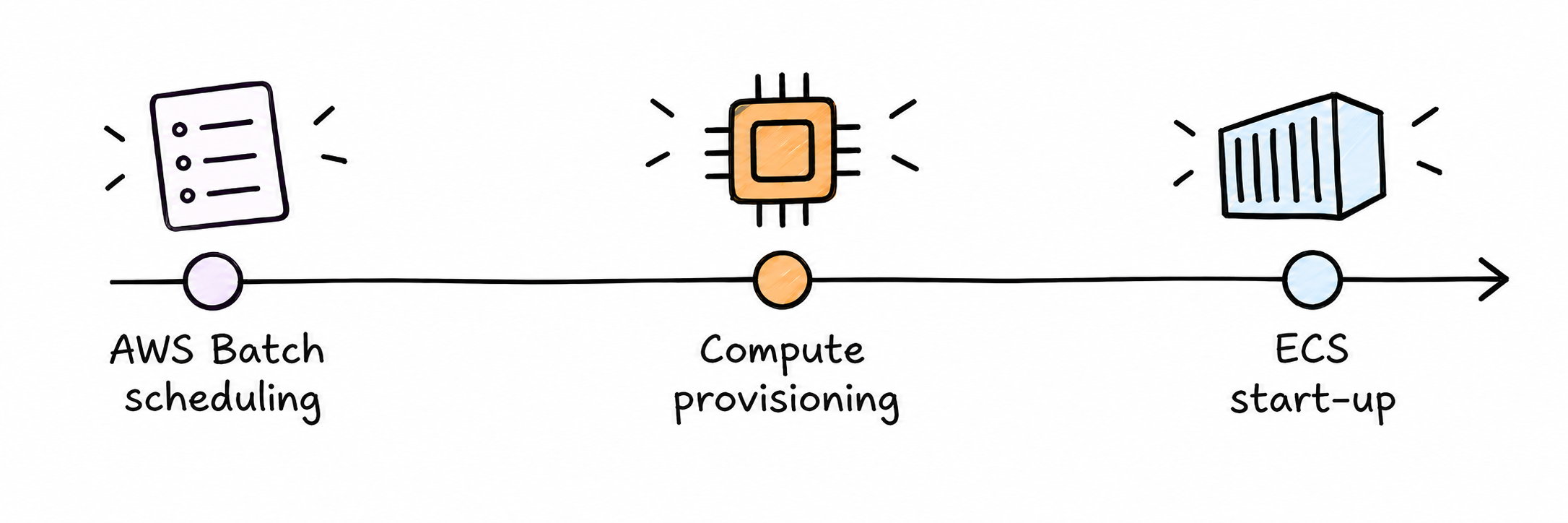
AWS Batch scheduling
This is the time after a job is submitted to a queue during which Batch decides what compute environment it should be submitted to. Note that I do not mean the time needed for the CE to be ready, just Batch itself making the decision! Depending on your settings, this can vary from a few seconds to a few minutes.
Potential impact: High
Compute provisioning
If you're using EC2 CEs and there are currently no EC2 container instances ready to take the job, this is the time taken to spin up a new EC2 instance to handle the job. EC2 cold starts are notoriously slow; depending on the instance requested and a bunch of other factors, this could take up to a few minutes.
Fargate is powered by serverless magic, so the equivalent of this step is typically a lot faster there.
Potential impact: High
ECS start-up
Once your instance is ready, the last step is spinning up the container on it! This mostly consists of pulling the container image, presumably from ECR.
Potential impact: Moderate
How to speed up AWS Batch start times
Okay, now that the boring context is out of the way, how do we actually make our jobs start up faster? Well, pretty much every way I've found is related to one of the above three parts. Let's go through them in the order of probable usefulness!
Don’t use fair-share scheduling (unless you need it)
If this applies to you, it's hands down the easiest big speed-up you could ask for.
By default, AWS Batch queues use a FIFO scheduling algorithm, which is trivial: the first job to go in a queue gets scheduled as soon as it's available. There's another option, though: fair-share scheduling. This tries to distribute compute evenly between jobs of different categories, which it does by running a bunch of queries and calculations about historical CPU time distribution and so on. In our testing, this step could easily take 1-2 minutes!
This finding comes from our own experimentation, and since fair-share scheduling is pretty opaque, we're not 100% sure exactly what part of it causes the delay. As I understand it, this slowdown is not documented anywhere by AWS, so setups may have it enabled without truly needing the fair-share feature set.
TL;DR
- Potential speed-up: 1-2 minutes
- Cons:
- Doesn't work if you actually need fair-share scheduling
Reduce your container image size
This one actually is officially recommended by AWS! It makes sense, really: big container images take longer to pull, so they'll slow down container start-up.
You can try to reduce your container image size by:
- Picking a smaller base image
- Only installing the dependencies needed for a project (e.g., JRE, not JDK)
- Using multi-stage builds to remove build dependencies from the final image
TL;DR
- Potential speed-up: up to 1-2 minutes
- Cons:
- Needs you to update your container images
If on EC2: use warm instances
On EC2 setups, EC2 provisioning will commonly be the biggest part of start-up time. But if there's already an EC2 instance available, you avoid this completely!
But there's an obvious downside to this: if the EC2 instance was available to take the job, it wasn't doing anything before that point. Using warm instances means you pay for idle compute. However, there are ways to mitigate this depending on your usage pattern.
There are two ways to keep instances available for EC2 CEs:
Warm instances (setting: minvCpus) keep the specified number of EC2 vCPU cores available at all times. If more jobs come in than this number can handle, more EC2 instances can still be provisioned; this is just the baseline always kept available. This is ideal if you have a consistent number of jobs constantly coming in. If you have jobs consistently coming in during part of the day, you can combine this with an EventBridge schedule to only configure minvCpus during this time period.
Cooldown latency (setting: scalingPolicy.minScaleDownDelayMinutes) keeps EC2 instances alive (and idle) for the specified amount of time after they complete a job. The timer resets whenever a new job is started on the machine. This is best if you have "spiky" periods of demand, where lots of jobs come in in a short, unpredictable window. The cooldown period ensures the just-spun-up EC2s remain available for some time for future jobs, without paying for that compute all the time.
TL;DR
- Potential speed-up: 1-2+ minutes
- Cons:
- Idle EC2 instances still cost money
If on EC2: give Batch more capacity options
If your compute environment is pinned to one instance type in one Availability Zone and that capacity is unavailable, your job can remain waiting even if plenty of equivalent compute is available elsewhere.
You can do this by adding more Availability Zones and more instance family and size options to your Compute Environment. When you have multiple instance types available, make sure to set your allocation strategy to BEST_FIT_PROGRESSIVE so Batch moves your jobs onto other EC2 types in your pool if the default isn't available. The default, BEST_FIT, doesn't run jobs unless the best instance type is available!
TL;DR
- Potential speed-up: Lots (during shortages), less otherwise
- Cons:
- More variation in the hardware running your jobs
If on Fargate: configure SOCI
SOCI is a special bit of AWS magic that can massively speed up your container image pull times for especially large container images. It works by making your container images lazy-loadable, allowing containers to start before the entire image has been downloaded.
To use SOCI, you must first create SOCI indexes for your images and upload them to ECR, either manually using the SOCI CLI or using AWS SOCI Image Builder.
AWS recommends trying SOCI for container images greater than 250 MiB compressed. Smaller images are less likely to see a meaningful reduction in start-up time, so the extra setup probably isn't worth it there.
TL;DR
- Potential speed-up: 1-2 minutes
- Cons:
- Requires updating your image build process to create SOCI indexes
(Bonus) If on EC2: consider just switching to Fargate
Honestly, Fargate is just a lot simpler than EC2. With Fargate, you never need to worry about managing warm EC2 instances. This can massively speed up start-up times without all the baggage that comes with warm compute.
There are a lot of legitimate reasons to use EC2, but Fargate's feature set has expanded recently. As of 5 June 2026, Batch Fargate containers support up to 32 vCPUs and 244 GiB of RAM.
However, there are still a few limitations to consider. Because Fargate pulls from a pool of available compute, CPU performance can vary between runs. AWS Fargate also does not support special compute types like GPUs and only supports a limited set of vCPU/RAM combinations. Finally, keep in mind Fargate is generally more expensive per unit of compute than EC2, though not paying for warm compute could easily make up for this depending on your use case.
TL;DR
- Potential speed-up: >2 minutes
- Cons:
- More expensive per unit of compute than EC2
- No support for GPUs and other EC2-exclusive features
- Less consistent CPU performance
- Fargate start-up times can be inconsistent during periods of high load
In conclusion
Unfortunately, besides a few quick wins, speeding up AWS Batch is like most things in cloud architecture: an annoyingly subtle and nuanced series of small decisions, each with its own trade-offs to consider for your unique situation. If you're looking for easy places to start, consider seeing if you've got fair-share scheduling turned on unnecessarily or could reduce your image size. If you'd like a deeper look at your specific situation and what might be the best solution for you, Mechanical Rock's team of industry-veteran cloud engineers can help you build a tailored and cost-effective solution for your use case in AWS Batch and beyond.
Appendix: some experiments to back all this up
To make sure I'm not just spouting nonsense here, I set up some quick experiments to put general numbers behind these claims. You can find the source code and reproduction instructions here. Some quick notes on the experimental setup:
- Everything ran in
ap-southeast-2, with six runs per configuration. - The main number is end-to-end Batch start-up time: from Batch creating the job to marking it
RUNNING. - To keep things cheap, EC2 jobs used On-Demand
c6a.largeinstances with1 vCPUand512 MiBof memory. Fargate jobs used its minimum0.25 vCPUand512 MiBconfiguration. - Every configuration used the same ~512 MiB compressed image. This is intentionally quite chunky to make image handling a more noticeable part of start-up.
We measure the start-up time as the time between the job getting submitted to AWS Batch and the job getting a status of RUNNING. The actual runtime of the job is excluded from the experiment.
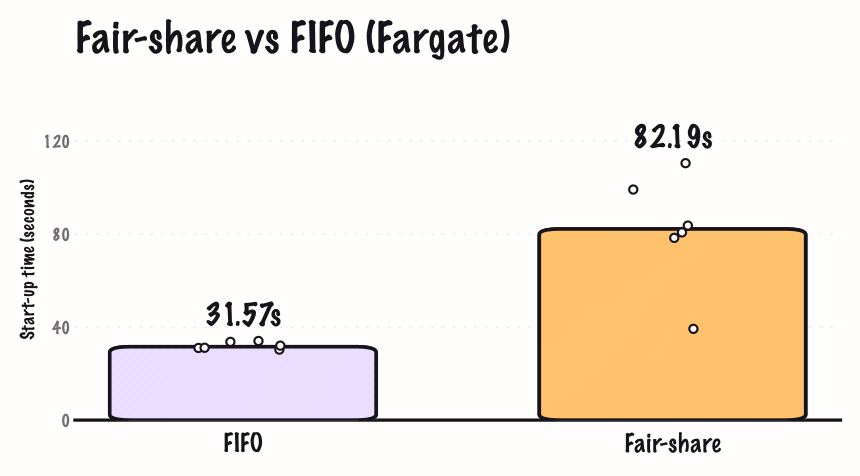
Experiment: Fair-share vs FIFO scheduling
For this one, I created FIFO and fair-share queues pointing at the same Fargate compute environment and submitted one isolated job at a time. The fair-share policy had no competing users to balance, so this measures its baseline latency rather than how well it distributes a busy backlog.
FIFO jobs started in a median of 31.57 seconds, compared with 82.19 seconds for fair-share. Almost all of that difference was inside Batch itself: median scheduling time was 4.55 seconds for FIFO and 56.13 seconds for fair-share, while the ECS/Fargate part was about 27 seconds in both cases.
Experiment: Warm EC2 vs cold EC2 vs Fargate
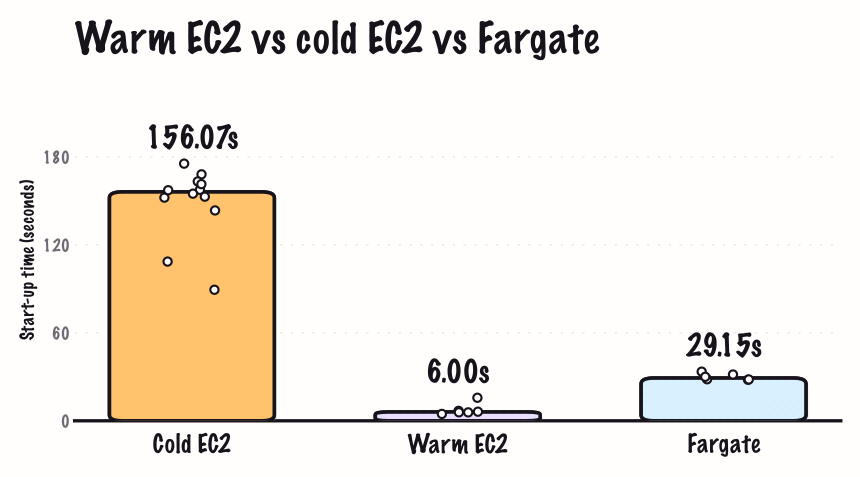
The big one: how does compute setup affect start-up? Before every cold run, we waited until the compute environment had no registered container instances; for the warm treatment, we kept one instance ready. The Fargate jobs used the same image but, as noted above, had a smaller CPU allocation.
Warm EC2 was by far the fastest, with a median start-up of 6.00 seconds. Fargate took 29.15 seconds, while cold EC2 took 156.07 seconds. The cold EC2 bar has twelve runs from the warm/cold and EC2/Fargate run sets because both used the exact same configuration. The roughly two-minute gap was overwhelmingly EC2 instance provisioning rather than Batch scheduling or container start-up.
Experiment: prefer-cached vs default pull behaviour
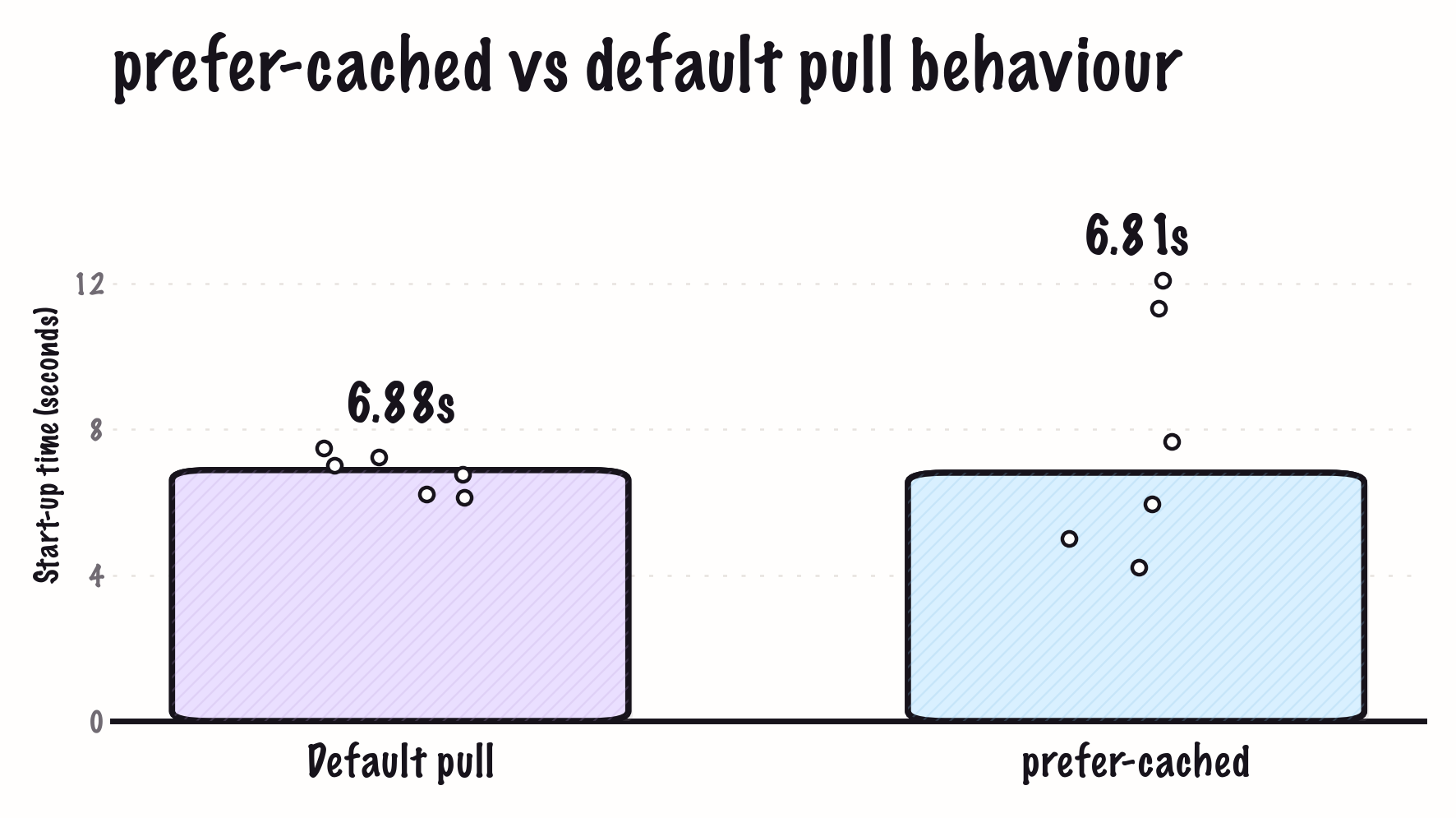
This is one I tried as it seemed to work well in a previous project, but it surprisingly gave no benefit here. Each setup keeps a c6a.large instance warm: one with the default ECS image pull behaviour and one with ECS_IMAGE_PULL_BEHAVIOR=prefer-cached. I primed both hosts with the image first, then verified that every measured job ran on the same host that had been primed. The idea here is that the instance with prefer-cached configured should not have to access ECR to pull its image, potentially speeding up start-up time.
The result was basically a tie: 6.88 seconds for the default behaviour and 6.81 seconds for prefer-cached. The container start-up component was a few hundred milliseconds lower at the median with prefer-cached, but ordinary Batch scheduling variation was larger than the saving. For an immutable image whose layers are already on disk, the default pull check was simply not expensive enough to matter here.
So much for that! In case you're still interested in trying this (or something similar) yourself, you can do it by adding the following user data to the Batch compute environment's launch template, following the same pattern as AWS's launch template example:
Content-Type: multipart/mixed; boundary="==BOUNDARY=="
MIME-Version: 1.0

--==BOUNDARY==
Content-Type: text/x-shellscript; charset="us-ascii"

#!/bin/bash
cat <<'CONFIG' >> /etc/ecs/ecs.config
ECS_IMAGE_PULL_BEHAVIOR=prefer-cached
CONFIG

--==BOUNDARY==--
Frequently asked questions
An AWS Batch job has to pass through Batch scheduling, compute provisioning, and ECS container start-up. The biggest delays are usually fair-share scheduling, provisioning a new EC2 instance, or pulling a large container image. Checking how long the job spends in each stage is the best way to find the actual bottleneck.
It depends heavily on the configuration. In our experiments, median start-up ranged from about **6 seconds on warm EC2 capacity** to **156 seconds on cold EC2 capacity**, with Fargate taking about **29 seconds**. Fair-share scheduling, capacity shortages, and larger images can add further delays.
Start by using FIFO scheduling unless you genuinely need fair-share scheduling, then reduce your container image size. For EC2 compute environments, keep some capacity warm and offer Batch multiple instance types and Availability Zones. For Fargate, consider SOCI when compressed images are larger than 250 MiB.
Fargate will generally start faster than EC2 when the EC2 compute environment has to provision a new instance. Warm EC2 capacity can be substantially faster than Fargate, but you pay for that capacity while it is idle. The right choice depends on whether start-up consistency, cost, or access to EC2-specific hardware matters most.
Set `minvCpus` on the compute environment to maintain a baseline amount of ready capacity. For bursty workloads, use `scalingPolicy.minScaleDownDelayMinutes` instead to keep instances alive for a while after jobs finish. Both approaches reduce cold starts but increase idle compute costs.
It can. In our isolated tests, fair-share jobs took a median of **82.19 seconds** to start, compared with **31.57 seconds** using FIFO on the same Fargate compute environment. Fair-share is useful when capacity must be distributed between users or workloads, but FIFO is a better fit when low scheduling latency is the priority.
Usually, yes. Smaller images take less time to pull before the container starts, with the greatest benefit on fresh EC2 instances and Fargate tasks. Use a smaller base image, remove unnecessary dependencies, and use multi-stage builds to keep build tools out of the final image.
Not if near-instant start-up is a strict requirement: AWS itself recommends considering another service for time-sensitive workloads. However, warm EC2 capacity, FIFO scheduling, and optimized images can bring start-up down to a few seconds in favorable conditions.