Astro ISR on AWS
You don't need a proprietary hosting platform to get Incremental Static Regeneration (ISR) with Astro. You need a server that can render pages, a CDN that respects cache headers, and a way to invalidate the right cached objects when content changes.
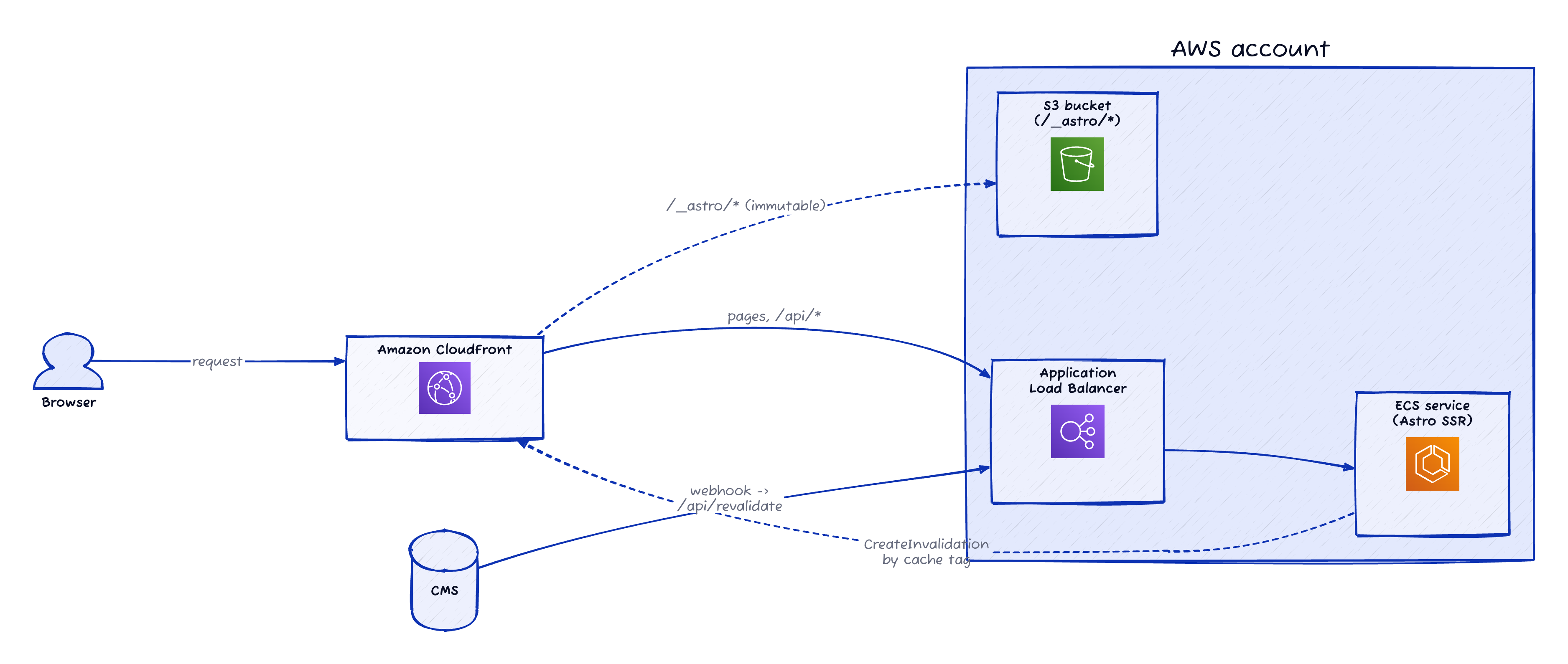
On AWS, that architecture is straightforward: Astro renders pages from ECS, S3 serves immutable build assets, and CloudFront caches the public responses. In 2026, CloudFront cache-tag invalidations use the normal CreateInvalidation API: tag entries like #article:123 go into the same Paths.Items list as URL paths, distinguished by the leading #.
Put those pieces together and you get the useful parts of ISR: render on demand, serve from the edge, and invalidate only the content that changed.
Key Takeaways
- Astro can implement ISR-style behaviour with ordinary HTTP headers and CDN caching.
- ECS should render pages, while S3 should serve immutable
/_astro/*assets. - CMS webhooks can hit a secret-protected ECS endpoint that invalidates CloudFront
#tagentries.
What Is ISR When You Strip Away the Branding?
ISR is easiest to understand as caching a page when first requested, then controlling regeneration by time or manual revalidation. That is the useful mental model: ISR is server rendering plus CDN caching plus a revalidation trigger.
The framework does not need to own the whole idea.
When a request arrives for a public page, your Astro server renders HTML. CloudFront stores that HTML because the response says it is cacheable. The next request gets the cached version from the edge. When the content changes, you invalidate the cached object by tag so the next request re-renders fresh HTML.
That is ISR. Not magic. Not something Next.js invented or Vercel owns. Just HTTP, a server, and a CDN that understands the headers you send it.
What Does the AWS Architecture Look Like?
AWS gives you the same building blocks with different names: ECS for the Astro SSR process, S3 for immutable assets, and CloudFront for cache routing. CloudFront's CreateInvalidation API now accepts tag entries alongside URL paths in the same Paths list, marked with a leading # — for example, #article:123.
The architecture is simple enough to draw without lying:
| Concern | AWS component | Responsibility |
|---|---|---|
| SSR pages | ECS service behind an ALB | Run the Astro Node server and render HTML |
| Static assets | S3 bucket | Serve content-hashed /_astro/* assets |
| Edge cache | CloudFront | Route requests, cache public pages, serve assets |
| Revalidation | Astro API endpoint on ECS | Validate CMS webhook and call CloudFront invalidation |
| Content source | CMS | Notify the app when entries change |
CloudFront should have at least two origins. The S3 origin handles static assets generated by Astro. The ALB or ECS origin handles SSR pages and API endpoints.
Getting Astro's content-hashed assets into S3 is a deploy-time concern: your CI pipeline runs astro build, then syncs dist/client/_astro/ to the bucket before rolling out the new ECS task definition. CloudFront then serves them straight from S3 without touching ECS.
Use behaviours to keep those concerns separate:
| Route pattern | Origin | Cache behaviour |
|---|---|---|
/_astro/* | S3 | Long-lived immutable caching |
/assets/* | S3 | Long-lived immutable caching if you use this path |
| Public content pages | ECS | Respect origin cache headers and cache tags |
| Dynamic/private pages | ECS | Do not cache |
/api/revalidate | ECS | Do not cache |
This is the part that often gets muddled. Do not send content-hashed static assets through ECS. Astro has already done the right thing by naming them with hashes. Put them in S3, cache them aggressively, and keep your page renderer focused on HTML.
How Should CloudFront Route Astro Pages and Assets?
In an Astro SSR deployment on AWS, CloudFront should route immutable assets to S3 and rendered pages to ECS. Astro assets are content-hashed, so they can use long TTLs. SSR pages need origin-controlled cache headers so each route can decide whether it behaves like ISR or stays dynamic.
Your static asset behaviour should be boring:
Path pattern: /_astro/*
Origin: S3
Cache-Control: public, max-age=31536000, immutable
Your page behaviour should be more flexible:
Path pattern: *
Origin: ECS / ALB
Cache policy: respect origin Cache-Control
Cache tag header: whatever you configure in CacheTagConfig
The exact CloudFront console and IaC settings will depend on your setup, but the principle matters more than the buttons. Static assets get a cache policy designed for immutable files. HTML responses get a cache policy that lets Astro decide cacheability per route.
CloudFront's cache-tag support is opt-in. The distribution needs a CacheTagConfig with the header name your origin uses. There is no magic default Cache-Tag header unless you configure CloudFront to read that header.
For example, if your Astro app returns Cache-Tag, your distribution config needs an equivalent CacheTagConfig entry. This is a partial excerpt, not a complete CloudFront distribution config:
{
  "CacheTagConfig": {
    "HeaderName": "Cache-Tag"
  }
}
If your origin returns a different header, such as x-cache-tag, then CacheTagConfig.HeaderName must match that instead. The examples below use Cache-Tag only because the distribution has been configured to read it.
How Do You Cache an Astro Page Like ISR?
Astro pages can set response headers through Astro.response.headers.set(...). On AWS, CloudFront reads standard Cache-Control directives such as max-age, s-maxage, and stale-while-revalidate, plus whichever cache-tag header your distribution is configured to read.
This assumes Astro is running in SSR mode with a Node-compatible runtime inside your ECS container. In astro.config.mjs, that usually means server output and a Node adapter:
import { defineConfig, envField } from "astro/config";
import node from "@astrojs/node";

export default defineConfig({
  output: "server",
  adapter: node({
    mode: "standalone",
  }),
  env: {
    schema: {
      CMS_WEBHOOK_SECRET: envField.string({
        context: "server",
        access: "secret",
      }),
      CLOUDFRONT_DISTRIBUTION_ID: envField.string({
        context: "server",
        access: "public",
      }),
    },
  },
});
The env.schema block declares the runtime secrets the revalidate endpoint will use later. Astro validates these at startup and exposes them through the typed astro:env/server import — no import.meta.env reach-through, no silent undefined if a deployment forgot to set them.
For a public article page, you might do this:
---
import { PortableText } from "astro-portabletext";
import { getArticle } from "../../lib/cms";

const article = await getArticle(Astro.params.slug);

if (!article) {
  return new Response(null, { status: 404 });
}

Astro.response.headers.set(
  "Cache-Control",
  "public, max-age=0, s-maxage=300, stale-while-revalidate=86400"
);

Astro.response.headers.set(
  "Cache-Tag",
  `article:${article.id},author:${article.authorId},content-type:article`
);
---

<html>
  <head>
    <title>{article.title}</title>
  </head>
  <body>
    <article>
      <h1>{article.title}</h1>
      <p>By {article.authorName}</p>
      <PortableText value={article.body} />
    </article>
  </body>
</html>
There are three separate ideas here.
Cache-Control is doing two jobs here. max-age=0 keeps browser HTML caching conservative, while s-maxage=300 tells shared caches such as CloudFront to keep the page fresh for five minutes. stale-while-revalidate=86400 lets CloudFront serve stale content while it refreshes in the background.
Cache-Tag is separate from the freshness policy. It tells CloudFront which semantic dependencies the cached response has, but only if your distribution's CacheTagConfig.HeaderName is configured to read that header.
The important part is not the literal header name. The important part is that Astro returns a semantic tag header and CloudFront's CacheTagConfig.HeaderName matches it.
How Do Dynamic Astro Pages Avoid the Cache?
Dynamic Astro pages should not emit public cache headers. Account pages, admin pages, preview routes, and anything user-specific should either omit CDN cache headers or explicitly send private, no-store. The rule is simple: if the response depends on a user secret, do not share-cache it.
For a private account page:
---
import { getAccount } from "../lib/accounts";

const user = Astro.locals.user;

if (!user) {
  return Astro.redirect("/login");
}

const account = await getAccount(user.id);

Astro.response.headers.set(
  "Cache-Control",
  "private, no-store"
);
---

<html>
  <head>
    <title>Your account</title>
  </head>
  <body>
    <h1>Your account</h1>
    <p>{account.email}</p>
  </body>
</html>
Do not tag this page. Do not cache it at CloudFront. Do not rely on tag invalidation to save you from a bad cache key.
This distinction is the whole architecture. Cached pages opt in by sending cache headers and tags. Dynamic pages opt out by not sending them.
How Does the CMS Invalidate Astro Pages on ECS?
AWS documents cache-tag invalidation through CreateInvalidation: tag entries appear in the same Paths.Items list as URL paths, distinguished by a leading #, such as #product:electronics (AWS CloudFront Developer Guide, retrieved 2026). You can even mix the two in one batch — for example, --paths "/index.html" "#user:12345". That means your ECS-hosted Astro app can expose a CMS webhook endpoint that verifies the sender, derives tags, and calls CloudFront.
Create an endpoint like src/pages/api/revalidate.ts:
import type { APIRoute } from "astro";
import { timingSafeEqual } from "node:crypto";
import { CMS_WEBHOOK_SECRET, CLOUDFRONT_DISTRIBUTION_ID } from "astro:env/server";
import {
  CloudFrontClient,
  CreateInvalidationCommand,
} from "@aws-sdk/client-cloudfront";

const cloudfront = new CloudFrontClient({});

function secretMatches(provided: string | null) {
  if (!provided || provided.length !== CMS_WEBHOOK_SECRET.length) return false;
  return timingSafeEqual(Buffer.from(provided), Buffer.from(CMS_WEBHOOK_SECRET));
}

export const POST: APIRoute = async ({ request }) => {
  if (!secretMatches(request.headers.get("x-webhook-secret"))) {
    return new Response("Unauthorized", { status: 401 });
  }

  const { id, entityType, updatedAt } = await request.json();
  if (!id || !entityType) {
    return new Response("Missing id or entityType", { status: 400 });
  }

  const tag = `${entityType}:${id}`;
  const callerReference =
    request.headers.get("idempotency-key") ?? `${tag}-${updatedAt ?? Date.now()}`;

  // CloudFront treats a duplicate CallerReference with identical paths as
  // idempotent and returns the existing invalidation, so retries with the
  // same idempotency-key are safe by design — no try/catch needed.
  await cloudfront.send(
    new CreateInvalidationCommand({
      DistributionId: CLOUDFRONT_DISTRIBUTION_ID,
      InvalidationBatch: {
        CallerReference: callerReference,
        Paths: { Quantity: 1, Items: [`#${tag}`] },
      },
    })
  );

  return Response.json({ invalidated: [tag] });
};
Configure your Sanity webhook with a small GROQ projection that renames the system fields so the receiver isn't sprinkled with underscores:
{
  "id": _id,
  "entityType": _type,
  "updatedAt": _updatedAt
}
Sanity then posts something like:
POST /api/revalidate HTTP/1.1
Host: www.example.com
Content-Type: application/json
x-webhook-secret: <shared secret>
sanity-webhook-signature: <signed payload signature>
idempotency-key: <unique delivery key>

{
  "id": "abc123",
  "entityType": "article",
  "updatedAt": "2026-05-06T10:00:00Z"
}
That invalidates exactly one tag: #article:abc123 — the article's own detail page. Listings that show this article (homepage, category pages, author pages) refresh on their own s-maxage window, which is usually fine: a typo fix doesn't need every listing on the site purged within seconds.
The expensive invalidations — #category:aws, #author:45, #content-type:article — are not things you want to fire on every edit. They're event-driven: when an article changes category, when an author bio is updated, when a piece is published or unpublished. The cleanest way to handle those is a separate webhook (Sanity lets you configure per-event filters) or a custom GROQ projection that surfaces what changed, so the endpoint can map specific edits to specific tag invalidations. The minimum endpoint above is a good default; expand it only when a class of edits actually needs broader purging.
The endpoint should be routed to ECS and never cached. Give the ECS task role permission to call cloudfront:CreateInvalidation for the specific distribution. Store CMS_WEBHOOK_SECRET and CLOUDFRONT_DISTRIBUTION_ID as ECS secrets or environment variables, not in code.
The snippet above is the minimum shared-secret shape, not the whole security story. If you're using Sanity, don't stop there. Sanity's webhook best practices recommend verifying webhook secrets, using signed payload tooling, optionally allowlisting Sanity webhook egress IPs, checking the idempotency-key header to avoid duplicate processing, and designing for delayed or out-of-order delivery.
The example above runs synchronously and returns 200 once CloudFront has accepted the invalidation. That is fine for small sites where the round-trip is fast and the failure mode of an occasional dropped webhook is acceptable. For a production version, treat the webhook as the enqueue step rather than the full invalidation worker: validate the payload, drop it onto SQS, and return 202 Accepted immediately. That keeps you inside webhook provider timeout windows (Sanity's is short) and gives a background worker space to deduplicate by idempotency key, derive tags, call CloudFront, and retry safely without holding the HTTP connection open.
What Tag Strategy Should You Use?
CloudFront processes up to 50 tags per cached object, with a maximum of 256 characters per tag. That is enough for a useful dependency model, but not enough to treat response headers like a database.
Use a small set of predictable tags:
| Page type | Example tags | Why |
|---|---|---|
| Article detail | article:123, author:45, content-type:article | Purge one article, author pages, or article indexes |
| Author page | author:45, content-type:article | Purge when author bio or authored content changes |
| Category page | category:aws, content-type:article | Purge when category membership changes |
| Homepage | homepage, content-type:article | Purge when homepage listings change |
The trick is to tag pages by the data they use, not by the URL they happen to live at.
Do not tag a listing page with every article ID once that list gets large. Use a collection tag like content-type:article. If an article changes, invalidate the article tag and the collection tag. That gives you precise detail-page purging without making list pages carry hundreds of tags.
A good tag strategy is intentionally boring. If tags need a wiki page to decode, they are probably too clever. Use entity type, entity ID, and a few stable collection tags.
What Can Go Wrong?
CloudFront tag invalidation is additive: path and wildcard invalidations still work, but tag invalidation only works when CacheTagConfig is enabled. AWS also notes that changing the configured header name can strand cached objects under the old tag header until they expire or are path-invalidated.
The common failure modes are not exotic.
First, you cache the wrong thing. If a response depends on a session, authorization header, or high-cardinality cookie, it probably should not be shared at the CDN. Start with public content pages only.
Second, you put too much logic in tags. Tags should identify dependencies, not encode every rendering condition. Cache keys and Vary behaviour still matter for locale, device, query parameters, and cookies.
Third, your webhook becomes a purge button for the internet. A shared secret is the minimum. For production, verify signed payloads where your CMS supports them, check idempotency keys, reject stale timestamps, rate-limit requests, and consider IP allowlisting. Sanity specifically documents signed webhook tooling and webhook egress IPs for this purpose.
Fourth, you forget browser caching. Long browser TTLs for HTML are painful because you cannot centrally invalidate a user's browser cache. Keep browser HTML caching conservative and let CloudFront do the heavier lifting.
Finally, you treat ISR like a freshness guarantee. It is not. It is a performance pattern with controlled staleness. Some users may see stale content briefly, especially during revalidation or propagation windows.
The Takeaway
Astro ISR on AWS is not a special adapter trick. It is an architecture.
Run Astro SSR in ECS. Put immutable assets in S3. Let CloudFront route between them. Teach public pages to emit cache headers and cache tags. Give your CMS a secure endpoint that invalidates #tag paths through CloudFront.
That gives you most of the useful ISR behaviour without hiding the model from your team. You can see where pages are rendered, where assets live, which responses are cacheable, and which CMS events invalidate them.
But if you really want to build fast, cache-friendly web applications on AWS, you need more than snippets. You need a team that understands frontend frameworks, CDN caching, infrastructure, and operational trade-offs together.
That's where Mechanical Rock comes in. We help teams architect and build production-ready cloud applications that balance performance, cost, and operational simplicity. Get in touch if you want to discuss how we can help your team ship better web platforms on AWS.
Frequently asked questions
Yes. Astro can implement ISR-style behaviour on AWS by using SSR on ECS, cache headers on public pages, CloudFront as the CDN cache, and CloudFront cache-tag invalidation for on-demand revalidation. The pattern is standards-based HTTP caching rather than a framework-owned feature.
No. Astro's content-hashed `/_astro/*` assets should be uploaded to S3 and cached with long immutable TTLs. ECS should render HTML pages and serve API endpoints. This keeps static asset traffic away from the SSR service.
The CMS calls a protected Astro endpoint running on ECS. That endpoint verifies the webhook secret or signed payload, maps the CMS entry to cache tags, and calls CloudFront `CreateInvalidation` with tag entries such as `#article:123` in the `Paths.Items` list.
No. Public content pages can send `Cache-Control` and your configured cache-tag header. Dynamic or private pages should send `Cache-Control: private, no-store` and avoid cache tags entirely.