Speak & It Shall Be Done: Building a Voice Assistant That Actually Works
"I need to schedule a meeting with someone who knows how to patch the ingress nginx controller vulnerability tomorrow afternoon."
It's a relatively simple request, yet it's one that would typically trigger a flurry of back-and-forth emails describing the actual problem, calendar checks, and manual coordination. But what if instead of all that, you can just call a number and have an agent do it for you? (be warned: i'm going to hit the buzzword quota on this one)
The typical voice assistant experience is a special kind of corporate hell. Press 9 to hear your options again. Press 0 to speak with someone who can't help you. Press any combination of numbers to be reminded that technology hates you personally.
"Sorry, I don't understand that request." Our digital utopia's most common catchphrase.
But here's the interesting part - that utopia isn't a lie anymore. It just took a different form. The new AI voice models are dragging us across the uncanny valley. And on the other side? Something almost human. Something that understands you the first time.
In this guide, I'll show you how I built a voice-powered workflow that does what it promises without all the digital suffering. Just conversation that becomes action. We'll feed it our corporate data. We'll give it tools. We'll create something that doesn't just understand your request - it actually does something about it.
Before We Begin
You'll need a few accounts set up:
- An n8n account (cloud or self-hosted)
- API Access to OpenAI (or your other favourite model)
- Eleven Labs account
- Google Calendar, Gmail, and accounts for any other tools you'd like to connect
Don't worry if you're not a developer - we'll focus on configuration rather than coding.
Step 1: Giving Your Assistant a Voice with Eleven Labs

The journey begins where most AI experiences do - with a blank prompt screen and a world of possibility. Eleven Labs provides the canvas, but turning it into something useful requires thoughtful design.
First, I logged into Eleven Labs and created a new assistant (selecting the "Blank template" option). But the real work came in shaping its personality and capabilities.
I wanted an assistant that felt like a helpful colleague rather than a robotic service: "Hi, this is the Mechanical Rock Voice Agent. I can take a message or answer any questions you have. How may I help you today?"
The system prompt however, needs far more attention:
You are the Mechanical Rock virtual receptionist, managing our phone system and helping callers with inquiries about our software development consulting services.

PRIMARY RESPONSIBILITIES:
- Answer questions about Mechanical Rock's software development consulting services
- Take messages when callers wish to leave one
- Assist with booking meetings based on staff availability

WHEN ANSWERING QUESTIONS:
- Provide clear, concise information about our software development services
- If you don't have enough information to answer a specific question, politely explain this limitation
- Maintain a professional, helpful tone throughout the conversation

WHEN TAKING MESSAGES:
- Only request contact details if the caller explicitly wants to leave a message or get in touch
- Collect: full name, company name, and the specific message
- If you already have sufficient context from the conversation, create a concise summary and submit that via the leave-message tool without asking for redundant information

WHEN BOOKING MEETINGS:
1. Use the get-date tool to check current date
2. Use the get-calendar tool to check staff availability
3. Offer the first available 30-minute slot
4. If the suggested time works for the caller, use the book-meeting tool to schedule it
5. If the requested staff member isn't available or there are no suitable slots, suggest leaving a message instead

ERROR HANDLING:
- Never mention technical errors to callers
- if a tool fails, simply say "Looks like I cant confirm for you straight away. I will leave a message for the team to get back to you."
- If any system error occurs, simply say "I'll make sure someone from our team reaches out to you" and proceed accordingly

Always maintain a professional, efficient approach while keeping responses brief and focused on the caller's needs.
This approach created an assistant that didn't just passively take requests but actively helped refine them.
I uploaded embeddings of all of our public information (case studies, offerings, clients, team, etc) to the Knowledge Base, giving the assistant context about what kind of work we do, and who can help out.
For the voice, I had way too much fun exploring them all, but ultimately settled on one that sounded natural but not too expressive - Paul (Australia), with the high-quality setting. It struck the right balance between clarity and warmth, though it did increase response time slightly.
Finally, I set up evaluation criteria to track whether the assistant successfully gathered all required meeting details. This would help me refine the prompts over time based on real conversation data.
Step 2: Connecting Eleven Labs to n8n
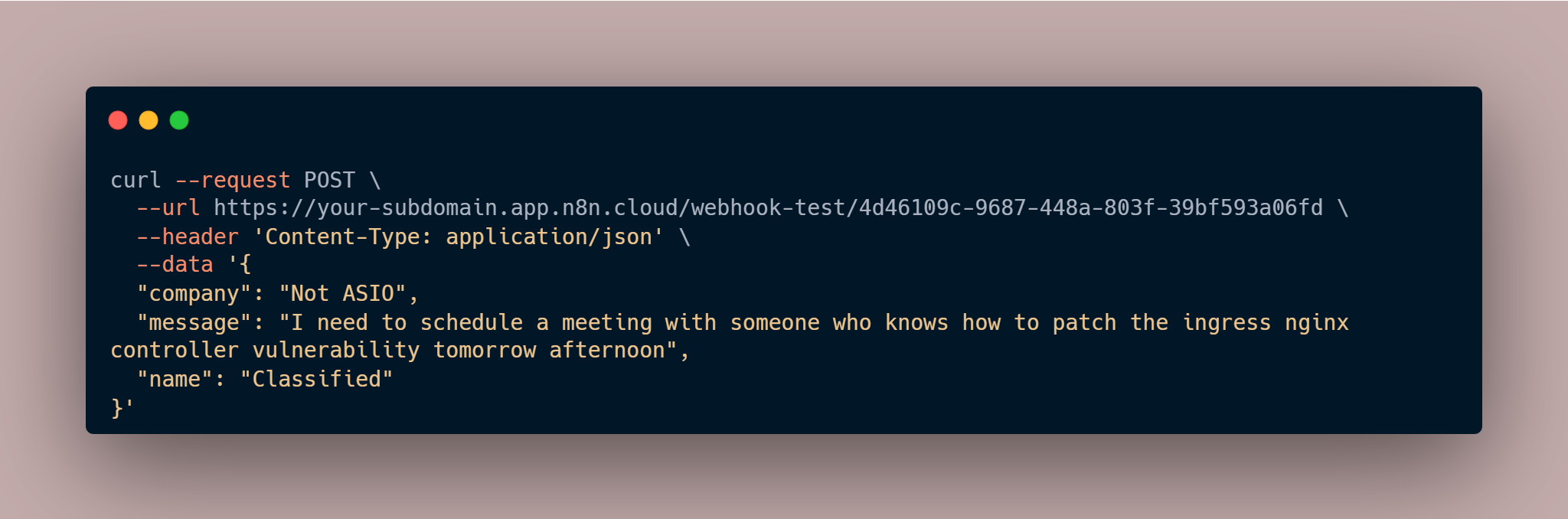
Now that your Eleven Labs assistant is set up, we need to configure it to send data to your n8n webhook:
-
Create a Webhook Integration:
- In your Eleven Labs assistant settings, go to the Integrations tab
- Select "Webhook" as the integration type
- Enter your n8n webhook URL:
https://your-n8n-instance.com/webhook/4d46109c-9687-448a-803f-39bf593a06fd - Configure the payload format to include the transcribed text and any extracted metadata
-
Test the Integration:
- Use the "Test Connection" button to ensure data flows correctly from Eleven Labs to n8n
- Check the n8n execution log to verify that the webhook is receiving data
Step 3: Understanding the Workflow Architecture
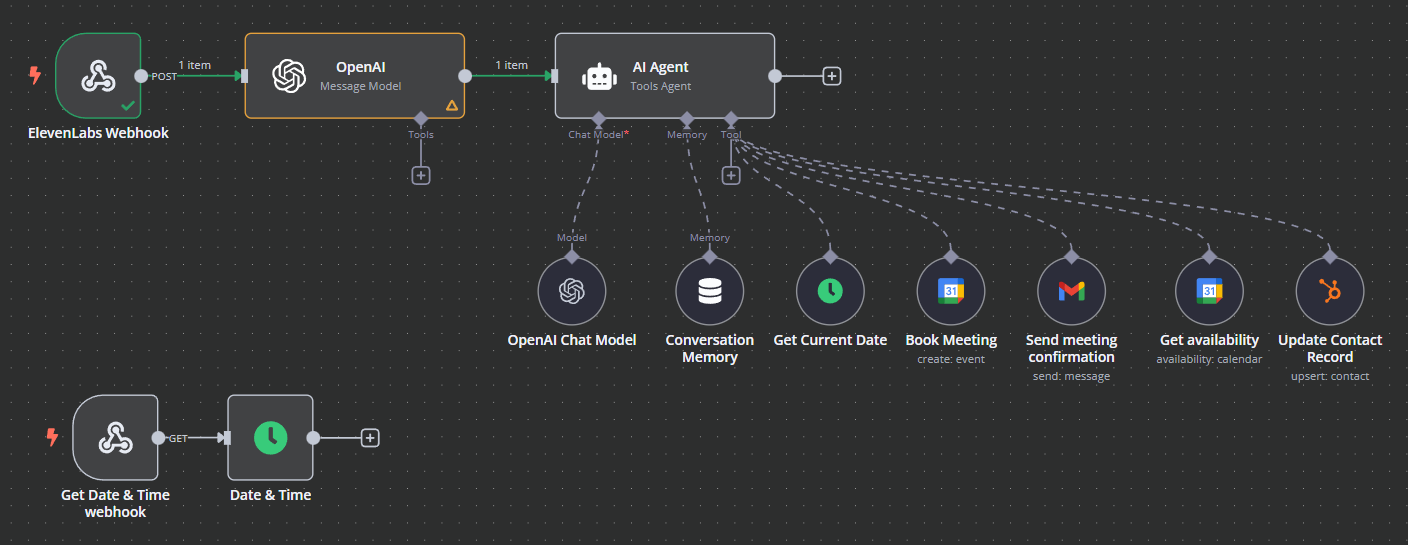
Let's examine the components of our n8n workflow:
- Webhook Node: Receives incoming data from Eleven Labs
- OpenAI Node: Transforms the raw data into a structured prompt for the AI agent
- AI Agent Node: The brain of our operation, making decisions based on the input
- Conversation Memory Node: This allows the agent to remember past conversations.
- Tool Nodes: Various actions our agent can perform:
- Check Availability (Google Calendar)
- Book Meeting (Google Calendar)
- Send Meeting Confirmation (Gmail)
- Update Contact Record (HubSpot)
- Get Current Date (DateTime)
Step 4: Configuring the OpenAI Processing Node
When the webhook receives data from Eleven Labs, the first step is to convert this into a format that our AI agent can understand and act upon.
- Open your workflow and select the OpenAI node
- Configure it with the following settings:
- Model: gpt-4o-mini
- System Message: "convert this data to a prompt that can be executed by an agent"
- User Message: "'$json.body.toJsonString()'"
This step is optional, and involves another API call but i've found it far more reliable as this transforms the raw JSON data from Eleven Labs into a clear, actionable prompt for our AI agent. The OpenAI node will parse the voice transcript and any metadata collected by Eleven Labs, identifying key information like requested meeting times or email content.
Step 5: Setting Up the AI Agent
The AI Agent is the core decision-maker in our workflow:
- Select the AI Agent node
- Configure the prompt type as "define"
- Set the text to use the output from our previous node: '$json.message.content'
- Add a system message: "You are a helpful assistant that has access to tools. The connected tools allow you to show availability, book meetings, update the hubspot CRM, and leave a message"
Step 5: Connecting the Language Model
For our AI Agent to function, it needs a language model:
- Add the OpenAI Chat Model node
- Configure it to use gpt-4o-mini (you will want to consider speed & token price when you select your model)
- Connect it to the AI Agent's "ai_languageModel" input
Step 6: Adding Functional Tools
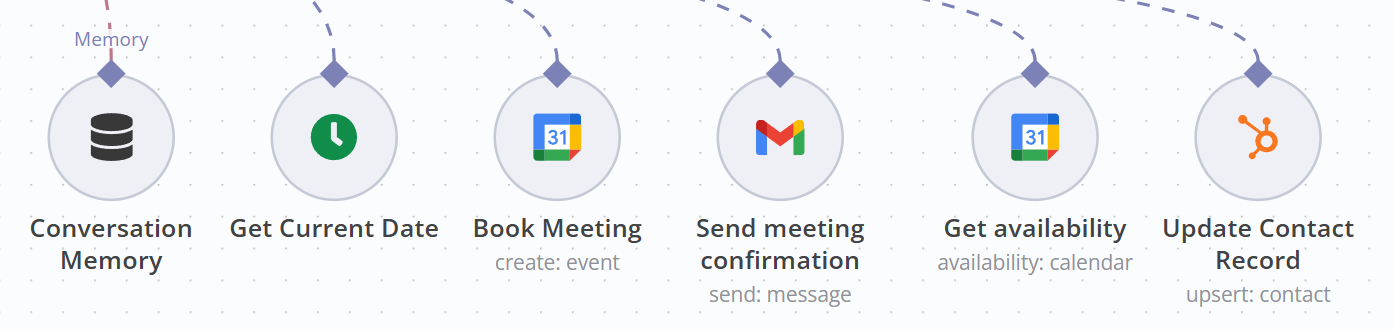
Now let's connect tools that our AI can use to perform actions:
Google Calendar Tool for Booking Meetings
- Configure the Google Calendar Tool:
- Calendar: Connect to your Google Calendar account
- Start and End parameters: These will be filled dynamically by the AI using
$fromAI('Start', '', 'string') - Connect this tool to the AI Agent
Gmail Tool for Sending Messages
- Configure the Gmail Tool:
- Send To: Allow AI to decide
- Subject and Message: These will be filled dynamically by the AI
- Connect this tool to the AI Agent
DateTime Tool for Time Awareness
- Add the DateTime Tool
- Connect it to the AI Agent without specific configuration as it will be used to check current date and time information
Step 7: Testing the End-to-End Workflow
Now that both your Eleven Labs assistant and n8n workflow are configured, it's time to test the complete system:
- Save your workflow and ensure it's active
- Open your Eleven Labs assistant in test mode
- Speak to the assistant with a scheduling or messaging request
- Watch as:
- The Eleven Labs assistant processes your voice and collects necessary information
- The collected data is sent to your n8n webhook
- The n8n workflow processes the request and executes the appropriate action
- The requested meeting is created or email is sent
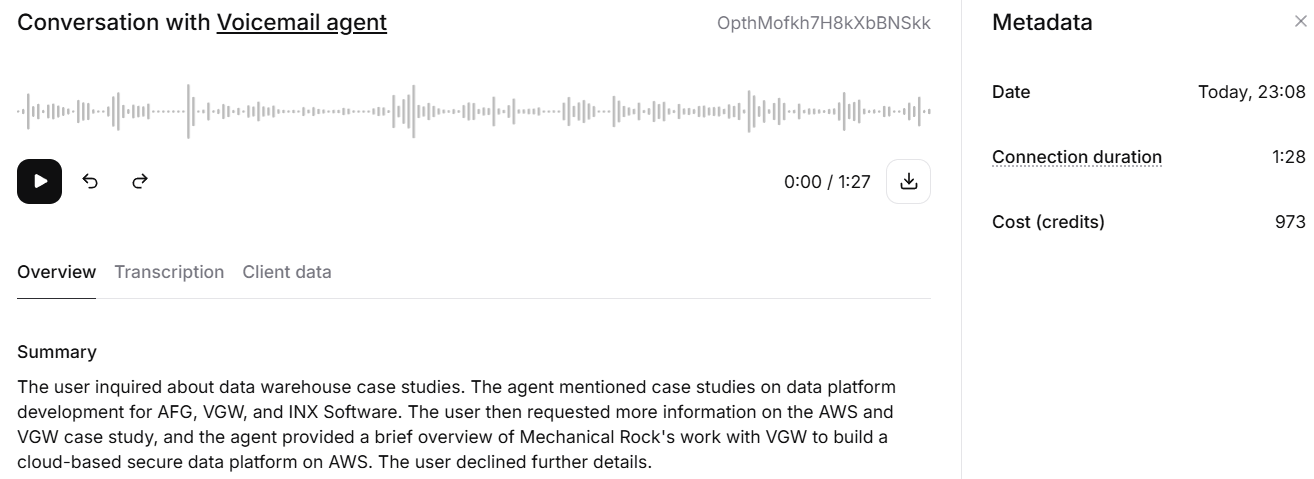
Example Voice Commands to Test
Try these examples to test different capabilities of your workflow:
- Scheduling: "I need to schedule a meeting with Jesse tomorrow at 2 PM for 30 minutes to discuss why i should rebuild my app in rust"
- Messaging: "Please send Jesse an email. The subject should be: Thank you for moving us off NextJS, you were right all along."
- Information: "What's Hamo's availability tomorrow afternoon?"
- Multiple Actions: "Im looking for help with migrating my on premises datacenter to AWS, do you have any examples where you've done this before and if so, can i talk to someone?"
Advanced Configuration
Error Handling
Add Error Trigger nodes to handle cases where:
- Calendar conflicts occur
- Email sending fails
- Voice input cannot be understood
Adding Authentication
For production use, implement authentication on your webhook:
- Update the Webhook node settings
- Enable "Authentication" option
- Choose your preferred authentication method
Integration with Other Systems
Your n8n workflow can be extended to integrate with:
- CRM systems for customer data
- Project management tools
- Custom databases
- SMS notification services
Eleven Labs Analytics and Improvement
To continuously improve your voice assistant:
-
Review Conversation History:
- In the Eleven Labs dashboard, go to the Call History tab
- Analyse conversations to identify common patterns and issues
- Use the evaluation criteria you set up to measure success rates
-
Refine Your Assistant's Knowledge:
- Update the knowledge base with new information as needed
- Add examples of successful interactions to improve response accuracy
-
Optimise Voice Configuration:
- Adjust voice settings based on user feedback
- Consider using different voices for different types of responses
Integrating the Assistant with Your Website
To make your assistant available to users:
- In the Eleven Labs dashboard, go to the Deployment tab
- Configure the widget appearance and behavior
- Copy the provided embed code
- Add the code to your website where you want the assistant to appear
Give it a shot!
Look, i know you're all trolls so i turned off the calendar integrations. But still, if you want to see how it works in real life you can ask it some questions about our offerings, previous work, or case studies via that popup in the bottom right.
Conclusion
By combining Eleven Labs' voice technology with n8n's powerful workflow automation and OpenAI's language capabilities, you've created an intelligent voice assistant that can handle real business tasks. This system provides a natural interface for scheduling, messaging, and information retrieval without requiring direct interaction with complex software.
The integration between Eleven Labs and n8n creates a seamless experience where users can speak naturally, have their requests understood, and see those requests fulfilled automatically through the appropriate business systems.
As voice AI continues to evolve, this kind of integration will become increasingly valuable for businesses looking to streamline operations while maintaining a personal touch.
If you'd like to discuss anything related to AI, Workflows, Data, or anything else really - please reach out.
Happy automating!